0:{"root":[["$","meta","1",{"property":"csp-nonce","nonce":"ba3ce9e5-d3a0-4f14-87e5-e951578419de"}],"$L1"],"formState":"$undefined","returnValue":"$undefined"}
2:"$Sreact.fragment"
3:I["7ada5cab5be8",[],"Header",1]
4:"$Sreact.suspense"
:HL["/assets/_layout-BzYdn0f6.css","stylesheet"]
1:["$","$2","2",{"children":[[["$","link","css:/assets/_layout-BzYdn0f6.css",{"rel":"stylesheet","precedence":"vite-rsc/importer-resources","href":"/assets/_layout-BzYdn0f6.css","data-rsc-css-href":"/assets/_layout-BzYdn0f6.css"}],"$undefined"],["$","html",null,{"lang":"en","className":"$undefined","children":[["$","head",null,{"children":[["$","meta",null,{"charSet":"UTF-8"}],["$","meta",null,{"name":"viewport","content":"width=device-width, initial-scale=1.0"}],["$","link",null,{"rel":"icon","type":"image/png","href":"/static/icons/apple-icon.png"}],["$","link",null,{"rel":"icon","type":"image/png","sizes":"32x32","href":"/static/icons/favicon-32x32.png"}],["$","link",null,{"rel":"apple-touch-icon","href":"/static/icons/apple-icon.png"}],["$","meta",null,{"name":"theme-color","content":"#1e40af"}],["$","meta",null,{"name":"language","content":"en_US"}],["$","meta",null,{"httpEquiv":"content-language","content":"en_US"}]]}],["$","body",null,{"className":"min-h-screen flex flex-col","children":[["$","$L3",null,{}],["$","main",null,{"className":"main-content grow bg-gray-100","children":["$","$4",null,{"fallback":[[["$","link","css:/assets/_layout-BzYdn0f6.css",{"rel":"stylesheet","precedence":"vite-rsc/importer-resources","href":"/assets/_layout-BzYdn0f6.css","data-rsc-css-href":"/assets/_layout-BzYdn0f6.css"}],"$undefined"],["$","div",null,{"className":"flex justify-center items-center p-8","children":["$","div",null,{"className":"animate-spin rounded-full h-8 w-8 border-b-2 border-indigo-600"}]}]],"children":[[["$","title",null,{"children":"How to rip DVD to iTunes on Mac | Gleez"}],["$","meta",null,{"name":"description","content":"iTunes is an application that allows the user to manage and play audio and video on a personal computer, purchase music videos App and Audio book through…"}],["$","meta",null,{"name":"keywords","content":"how, rip, dvd, itunes, mac, Gleez, privacy, secure productivity"}],["$","meta",null,{"name":"author","content":"zhang"}],["$","meta",null,{"property":"og:title","content":"How to rip DVD to iTunes on Mac | Gleez"}],["$","meta",null,{"property":"og:description","content":"iTunes is an application that allows the user to manage and play audio and video on a personal computer, purchase music videos App and Audio book through…"}],["$","meta",null,{"property":"og:type","content":"article"}],["$","meta",null,{"property":"og:url","content":"https://gleez.com/s/how-to-rip-dvd-to-itunes-on-mac"}],["$","meta",null,{"property":"og:image","content":"/static/og.png"}],["$","meta",null,{"property":"og:image:alt","content":"How to rip DVD to iTunes on Mac"}],["$","meta",null,{"property":"og:site_name","content":"Gleez"}],["$","meta",null,{"property":"og:locale","content":"en_US"}],["$","meta",null,{"property":"article:published_time","content":"2010-07-15T01:48:19.000Z"}],["$","meta",null,{"property":"article:modified_time","content":"2018-12-31T17:59:35.000Z"}],["$","meta",null,{"property":"article:author","content":"https://gleez.com/author/73618423808406"}],[],["$","meta",null,{"name":"twitter:card","content":"summary_large_image"}],["$","meta",null,{"name":"twitter:title","content":"How to rip DVD to iTunes on Mac | Gleez"}],["$","meta",null,{"name":"twitter:description","content":"iTunes is an application that allows the user to manage and play audio and video on a personal computer, purchase music videos App and Audio book through…"}],["$","meta",null,{"name":"twitter:image","content":"/static/og.png"}],["$","meta",null,{"name":"twitter:image:alt","content":"How to rip DVD to iTunes on Mac"}],["$","meta",null,{"name":"twitter:site","content":"@gleeztech"}],["$","meta",null,{"name":"twitter:creator","content":"@gleeztech"}],["$","link",null,{"rel":"canonical","href":"https://gleez.com/s/how-to-rip-dvd-to-itunes-on-mac"}],["$","meta",null,{"name":"robots","content":"index, follow"}],["$","meta",null,{"name":"googlebot","content":"index, follow, max-snippet:-1, max-image-preview:large"}],["$","script",null,{"type":"application/ld+json","dangerouslySetInnerHTML":{"__html":"{\"@context\":\"https://schema.org\",\"@type\":\"BlogPosting\",\"headline\":\"How to rip DVD to iTunes on Mac\",\"description\":\"iTunes is an application that allows the user to manage and play audio and video on a personal computer, purchase music videos App and Audio book through…\",\"image\":\"/static/og.png\",\"author\":{\"@type\":\"Person\",\"name\":\"zhang\"},\"publisher\":{\"@type\":\"Organization\",\"name\":\"Gleez\",\"logo\":{\"@type\":\"ImageObject\",\"url\":\"https://gleez.tech/static/logo-512.png\"}},\"datePublished\":\"2010-07-15T01:48:19.000Z\",\"dateModified\":\"2018-12-31T17:59:35.000Z\",\"mainEntityOfPage\":{\"@type\":\"WebPage\",\"@id\":\"https://gleez.com/s/how-to-rip-dvd-to-itunes-on-mac\"}}"}}]],"$L5"]}]}],"$L6"]}]]}]]}]
7:T40f,data:image/svg+xml;utf8,%3Csvg%20width%3D%2232%22%20height%3D%2232%22%20viewBox%3D%220%200%2032%2032%22%20%0A%20%20%20%20%20%20%20%20%20xmlns%3D%22http%3A%2F%2Fwww.w3.org%2F2000%2Fsvg%22%20role%3D%22img%22%20aria-label%3D%22Avatar%20for%20zhang%22%3E%0A%20%20%20%20%20%20%3Crect%20width%3D%22100%25%22%20height%3D%22100%25%22%20fill%3D%22hsl(356%2C%2081%25%2C%2056%25)%22%20rx%3D%223.2%22%20%2F%3E%0A%20%20%20%20%20%20%3Ctext%20x%3D%2250%25%22%20y%3D%2250%25%22%20%0A%20%20%20%20%20%20%20%20%20%20%20%20font-family%3D%22sans-serif%22%20%0A%20%20%20%20%20%20%20%20%20%20%20%20font-size%3D%2212.8%22%20%0A%20%20%20%20%20%20%20%20%20%20%20%20font-weight%3D%22bold%22%20%0A%20%20%20%20%20%20%20%20%20%20%20%20fill%3D%22%23FFFFFF%22%20%0A%20%20%20%20%20%20%20%20%20%20%20%20text-anchor%3D%22middle%22%20%0A%20%20%20%20%20%20%20%20%20%20%20%20dominant-baseline%3D%22central%22%0A%20%20%20%20%20%20%20%20%20%20%20%20style%3D%22user-select%3A%20none%3B%22%3E%0A%20%20%20%20%20%20%20%20Z%0A%20%20%20%20%20%20%3C%2Ftext%3E%0A%20%20%20%20%3C%2Fsvg%3E8:Tf12,iTunes is an application that allows the user to manage and play audio and video on a personal computer, purchase music videos App and Audio book through its built-in music store, download free podcasts, back up songs onto a CD, encode music into a number of different audio formats, share library over a local network.Now this article will teach you how to convert dvd to itunes for mac.
iTunes plays musics and videos downloaded from the iTunes Store, imported from CD and QuickTime-compatible files (labeled “.mov” and “.mp4”). iTunes also can convert WMA to AAC to play.Now let's begin how to convert dvd to itunes mac.
Limited video and audio formats supported by iTunes, so how if you want to play YouTube FLV music video, camera HD video, homemade DVDs or commercial DVD movies etc on iTunes. Use a professional third party software to transfer dvd to itunes mac and convert dvd to itunes for mac supported formats to play. Wondershare dvd to itunes ripper for mac can convert DVDs and videos to high quality output videos on Mac OS X to play not only on iTunes but also on iPod, iPhone, Apple TV, QuickTime, popular MP4 and MP3 players, Mobile Phones and so on. It can rip copy-protected DVD movies and convert video to all popular video and audio formats including MPEG-4, MP4, AVI, MOV, M4V, 3GP, MPG, MPEG, FLV, MP3, M4A, AAC, AC3, ASF with excellent.
To transfer dvd to itunes mac ,First have a look at the mac dvd to itunes ripper:
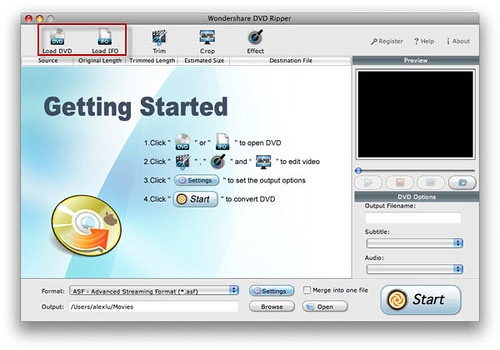
It is easy to use for 3 steps to transfer dvd to itunes on mac: First ,import dvd videos .Second, select itunes m4v or itunes mp4 to rip dvd ,you can also convert them to the above mentioned formats as you like.Third,click start button to convert dvd to itunes mac.
Click Music or Movies under LIBRARY, drag and drop the music or movie from the library file list to your IPOD menu. Also you can add the media source by iPod sync, but it will cover all your musics and videos you imported before.
Tags: convert dvd to itunes mac, import dvd to itunes mac, transfer dvd to itunes mac,download dvd to itunes for mac
,how to transfer a dvd to itunes
5:["$","$4",null,{"fallback":[[["$","link","css:/assets/_layout-BzYdn0f6.css",{"rel":"stylesheet","precedence":"vite-rsc/importer-resources","href":"/assets/_layout-BzYdn0f6.css","data-rsc-css-href":"/assets/_layout-BzYdn0f6.css"}],"$undefined"],["$","div",null,{"className":"flex justify-center items-center p-8","children":["$","div",null,{"className":"animate-spin rounded-full h-8 w-8 border-b-2 border-indigo-600"}]}]],"children":["$","div",null,{"className":"bg-white/95 mt-0.5 py-6 sm:py-12","children":["$","article",null,{"className":"mx-auto w-full max-w-2xl format format-sm sm:format-base lg:format-lg format-blue dark:format-invert","children":[["$","header",null,{"className":"mb-4 lg:mb-6 not-format","children":[["$","h1",null,{"className":"mb-4 text-3xl font-extrabold leading-tight text-gray-900 lg:mb-6 lg:text-4xl dark:text-white","children":"How to rip DVD to iTunes on Mac"}],["$","address",null,{"className":"flex items-center mb-6 not-italic","children":["$","div",null,{"className":"inline-flex items-center text-sm text-gray-900 dark:text-white","children":[["$","img",null,{"className":"mr-3 w-8 h-8 rounded-full","src":"$7","alt":"zhang"}],["$","a",null,{"href":"/author/zhang_73618423808406","rel":"author","className":"font-bold capitalize hover:underline dark:text-white","children":"zhang"}],["$","span",null,{"className":"mx-1 text-md text-gray-400 dark:text-gray-500","children":"·"}],["$","span",null,{"className":"inline-flex items-center ml-1 text-gray-500 dark:text-gray-400","children":"2 min read"}],["$","span",null,{"className":"mx-1 text-md text-gray-400 dark:text-gray-500","children":"·"}],["$","time",null,{"dateTime":"Thu Jul 15 2010","className":"text-gray-500 dark:text-gray-400","children":"Jul 15, 2010"}],[["$","span",null,{"className":"mx-1 text-md text-gray-400 dark:text-gray-500","children":"·"}],["$","a","tips-and-tricks",{"href":"/t/tips-and-tricks","className":"capitalize text-sm text-gray-500 dark:text-gray-400 hover:text-gray-600","children":"tips & tricks"}]]]}]}]]}],["$","div",null,{"className":"lead prose mt-4 text-lg leading-8 text-gray-600","children":["$","div",null,{"dangerouslySetInnerHTML":{"__html":"$8"}}]}],"$L9","$La"]}]}]}]
b:T63b,M12.315 2c2.43 0 2.784.013 3.808.06 1.064.049 1.791.218 2.427.465a4.902 4.902 0 011.772 1.153 4.902 4.902 0 011.153 1.772c.247.636.416 1.363.465 2.427.048 1.067.06 1.407.06 4.123v.08c0 2.643-.012 2.987-.06 4.043-.049 1.064-.218 1.791-.465 2.427a4.902 4.902 0 01-1.153 1.772 4.902 4.902 0 01-1.772 1.153c-.636.247-1.363.416-2.427.465-1.067.048-1.407.06-4.123.06h-.08c-2.643 0-2.987-.012-4.043-.06-1.064-.049-1.791-.218-2.427-.465a4.902 4.902 0 01-1.772-1.153 4.902 4.902 0 01-1.153-1.772c-.247-.636-.416-1.363-.465-2.427-.047-1.024-.06-1.379-.06-3.808v-.63c0-2.43.013-2.784.06-3.808.049-1.064.218-1.791.465-2.427a4.902 4.902 0 011.153-1.772A4.902 4.902 0 015.45 2.525c.636-.247 1.363-.416 2.427-.465C8.901 2.013 9.256 2 11.685 2h.63zm-.081 1.802h-.468c-2.456 0-2.784.011-3.807.058-.975.045-1.504.207-1.857.344-.467.182-.8.398-1.15.748-.35.35-.566.683-.748 1.15-.137.353-.3.882-.344 1.857-.047 1.023-.058 1.351-.058 3.807v.468c0 2.456.011 2.784.058 3.807.045.975.207 1.504.344 1.857.182.466.399.8.748 1.15.35.35.683.566 1.15.748.353.137.882.3 1.857.344 1.054.048 1.37.058 4.041.058h.08c2.597 0 2.917-.01 3.96-.058.976-.045 1.505-.207 1.858-.344.466-.182.8-.398 1.15-.748.35-.35.566-.683.748-1.15.137-.353.3-.882.344-1.857.048-1.055.058-1.37.058-4.041v-.08c0-2.597-.01-2.917-.058-3.96-.045-.976-.207-1.505-.344-1.858a3.097 3.097 0 00-.748-1.15 3.098 3.098 0 00-1.15-.748c-.353-.137-.882-.3-1.857-.344-1.023-.047-1.351-.058-3.807-.058zM12 6.865a5.135 5.135 0 110 10.27 5.135 5.135 0 010-10.27zm0 1.802a3.333 3.333 0 100 6.666 3.333 3.333 0 000-6.666zm5.338-3.205a1.2 1.2 0 110 2.4 1.2 1.2 0 010-2.4z6:["$","footer",null,{"className":"bg-gray-900 dark:bg-gray-900","children":["$","div",null,{"className":"mx-auto max-w-7xl px-6 py-4.5 md:flex md:items-center md:justify-between lg:px-8","children":[["$","div",null,{"className":"flex justify-center space-x-6 md:order-2","children":[["$","a","Facebook",{"href":"https://facebook.com/gleeztech","target":"_blank","rel":"noopener noreferrer","className":"text-gray-400 hover:text-gray-500","children":[["$","span",null,{"className":"sr-only","children":"Facebook"}],["$","svg",null,{"className":"h-6 w-6","fill":"currentColor","viewBox":"0 0 24 24","aria-hidden":"true","children":["$","path",null,{"fillRule":"evenodd","d":"M22 12c0-5.523-4.477-10-10-10S2 6.477 2 12c0 4.991 3.657 9.128 8.438 9.878v-6.987h-2.54V12h2.54V9.797c0-2.506 1.492-3.89 3.777-3.89 1.094 0 2.238.195 2.238.195v2.46h-1.26c-1.243 0-1.63.771-1.63 1.562V12h2.773l-.443 2.89h-2.33v6.988C18.343 21.128 22 16.991 22 12z","clipRule":"evenodd"}]}]]}],["$","a","Instagram",{"href":"https://instagram.com/gleeztech","target":"_blank","rel":"noopener noreferrer","className":"text-gray-400 hover:text-gray-500","children":[["$","span",null,{"className":"sr-only","children":"Instagram"}],["$","svg",null,{"className":"h-6 w-6","fill":"currentColor","viewBox":"0 0 24 24","aria-hidden":"true","children":["$","path",null,{"fillRule":"evenodd","d":"$b","clipRule":"evenodd"}]}]]}],["$","a","X",{"href":"https://x.com/gleeztech","target":"_blank","rel":"noopener noreferrer","className":"text-gray-400 hover:text-gray-500","children":[["$","span",null,{"className":"sr-only","children":"X"}],["$","svg",null,{"className":"h-6 w-6","fill":"currentColor","viewBox":"0 0 24 24","aria-hidden":"true","children":["$","path",null,{"d":"M13.6823 10.6218L20.2391 3H18.6854L12.9921 9.61788L8.44486 3H3.2002L10.0765 13.0074L3.2002 21H4.75404L10.7663 14.0113L15.5685 21H20.8131L13.6819 10.6218H13.6823ZM11.5541 13.0956L10.8574 12.0991L5.31391 4.16971H7.70053L12.1742 10.5689L12.8709 11.5655L18.6861 19.8835H16.2995L11.5541 13.096V13.0956Z"}]}]]}],"$Lc"]}],"$Ld"]}]}]
9:null
a:["$","$4",null,{"fallback":["$","div",null,{"className":"comments-skeleton","children":[["$","div",null,{"className":"h-6 bg-gray-200 rounded w-32 mb-4 animate-pulse"}],["$","div",null,{"className":"space-y-3","children":[["$","div","1",{"className":"h-16 bg-gray-100 rounded animate-pulse"}],["$","div","2",{"className":"h-16 bg-gray-100 rounded animate-pulse"}],["$","div","3",{"className":"h-16 bg-gray-100 rounded animate-pulse"}]]}]]}],"children":"$Le"}]
c:["$","a","GitHub",{"href":"https://github.com/gleez","target":"_blank","rel":"noopener noreferrer","className":"text-gray-400 hover:text-gray-500","children":[["$","span",null,{"className":"sr-only","children":"GitHub"}],["$","svg",null,{"className":"h-6 w-6","fill":"currentColor","viewBox":"0 0 24 24","aria-hidden":"true","children":["$","path",null,{"fillRule":"evenodd","d":"M12 2C6.477 2 2 6.484 2 12.017c0 4.425 2.865 8.18 6.839 9.504.5.092.682-.217.682-.483 0-.237-.008-.868-.013-1.703-2.782.605-3.369-1.343-3.369-1.343-.454-1.158-1.11-1.466-1.11-1.466-.908-.62.069-.608.069-.608 1.003.07 1.531 1.032 1.531 1.032.892 1.53 2.341 1.088 2.91.832.092-.647.35-1.088.636-1.338-2.22-.253-4.555-1.113-4.555-4.951 0-1.093.39-1.988 1.029-2.688-.103-.253-.446-1.272.098-2.65 0 0 .84-.27 2.75 1.026A9.564 9.564 0 0112 6.844c.85.004 1.705.115 2.504.337 1.909-1.296 2.747-1.027 2.747-1.027.546 1.379.202 2.398.1 2.651.64.7 1.028 1.595 1.028 2.688 0 3.848-2.339 4.695-4.566 4.943.359.309.678.92.678 1.855 0 1.338-.012 2.419-.012 2.747 0 .268.18.58.688.482A10.019 10.019 0 0022 12.017C22 6.484 17.522 2 12 2z","clipRule":"evenodd"}]}]]}]
d:["$","div",null,{"className":"mt-8 md:order-1 md:mt-0","children":["$","p",null,{"className":"text-sm leading-5 text-gray-400","children":["© 2005 - ",2026," Gleez Inc. All rights reserved."]}]}]
f:T414,data:image/svg+xml;utf8,%3Csvg%20width%3D%2232%22%20height%3D%2232%22%20viewBox%3D%220%200%2032%2032%22%20%0A%20%20%20%20%20%20%20%20%20xmlns%3D%22http%3A%2F%2Fwww.w3.org%2F2000%2Fsvg%22%20role%3D%22img%22%20aria-label%3D%22Avatar%20for%20spring1234%22%3E%0A%20%20%20%20%20%20%3Crect%20width%3D%22100%25%22%20height%3D%22100%25%22%20fill%3D%22hsl(153%2C%2067%25%2C%2047%25)%22%20rx%3D%223.2%22%20%2F%3E%0A%20%20%20%20%20%20%3Ctext%20x%3D%2250%25%22%20y%3D%2250%25%22%20%0A%20%20%20%20%20%20%20%20%20%20%20%20font-family%3D%22sans-serif%22%20%0A%20%20%20%20%20%20%20%20%20%20%20%20font-size%3D%2212.8%22%20%0A%20%20%20%20%20%20%20%20%20%20%20%20font-weight%3D%22bold%22%20%0A%20%20%20%20%20%20%20%20%20%20%20%20fill%3D%22%23FFFFFF%22%20%0A%20%20%20%20%20%20%20%20%20%20%20%20text-anchor%3D%22middle%22%20%0A%20%20%20%20%20%20%20%20%20%20%20%20dominant-baseline%3D%22central%22%0A%20%20%20%20%20%20%20%20%20%20%20%20style%3D%22user-select%3A%20none%3B%22%3E%0A%20%20%20%20%20%20%20%20S%0A%20%20%20%20%20%20%3C%2Ftext%3E%0A%20%20%20%20%3C%2Fsvg%3E10:Tb70,Convert flv video formats to *: If you also wanna convert video formats from [flv to mp4 mac](http://www.aimersoft.com/convert-flv/guide-of-converting-flv-to-mp4-mac.html), the program [flv to mp4 converter mac](http://www.aimersoft.com/convert-flv/guide-of-converting-flv-to-mp4-mac.html) can help you. It can [convert flv to mp4](http://www.aimersoft.com/convert-flv/guide-of-converting-flv-to-mp4-mac.html)([convert .flv to .mp4 mac](http://www.aimersoft.com/convert-flv/guide-of-converting-flv-to-mp4-mac.html)) video format, also support to [convert mp4 to flv mac](http://www.aimersoft.com/convert-flv/guide-of-converting-flv-to-mp4-mac.html) only if redefining the settings.
Wanna convert video formats from [flv to mov mac](http://www.aimersoft.com/convert-flv/convert-flv-to-mov-mac-edit-imovie.html), the program [flv to mov converter](http://www.aimersoft.com/convert-flv/convert-flv-to-mov-mac-edit-imovie.html) can help you. It can [convert flv to mov](http://www.aimersoft.com/convert-flv/convert-flv-to-mov-mac-edit-imovie.html)( [convert .flv to .mov](http://www.aimersoft.com/convert-flv/convert-flv-to-mov-mac-edit-imovie.html)) video format, also support to [convert mov to flv mac](http://www.aimersoft.com/convert-flv/convert-flv-to-mov-mac-edit-imovie.html) only if redefining the settings.
Wanna convert video formats from [flv to quicktime](http://www.aimersoft.com/convert-flv/convert-flv-to-mov-mac-edit-imovie.html), the program [flv to mov converter](http://www.aimersoft.com/convert-flv/convert-flv-to-mov-mac-edit-imovie.html) can help you. It can [convert flv to quicktime](http://www.aimersoft.com/convert-flv/convert-flv-to-mov-mac-edit-imovie.html)video files, also support to [convert mov to flv mac](http://www.aimersoft.com/convert-flv/convert-flv-to-mov-mac-edit-imovie.html), [flv to mov mac](http://www.aimersoft.com/convert-flv/convert-flv-to-mov-mac-edit-imovie.html) only if redefining the settings.
Wanna convert video formats from [flv to avi mac](http://www.aimersoft.com/convert-flv/convert-flv-to-avi-on-mac.html), the program [.flv to avi converter for mac](http://www.aimersoft.com/convert-flv/convert-flv-to-avi-on-mac.html) can help you. It can [convert flv to avi mac](http://www.aimersoft.com/convert-flv/convert-flv-to-avi-on-mac.html)( [convert flv to avi for mac](http://www.aimersoft.com/convert-flv/convert-flv-to-avi-on-mac.html)) video files, also support [.flv to avi](http://www.aimersoft.com/convert-flv/convert-flv-to-avi-on-mac.html) video format converted.
The best program for [converting flv to mpeg](http://www.aimersoft.com/convert-flv/convert-flv-to-avi-on-mac.html) video files is the [flv mpegi converter mac](http://www.aimersoft.com/convert-flv/convert-flv-to-avi-on-mac.html). With it, you can learn [how to convert flv to mpeg mac](http://www.aimersoft.com/convert-flv/convert-flv-to-avi-on-mac.html) easily and quickly but good quality.e:["$","div",null,{"className":"mt-8","children":[["$","h3",null,{"className":"text-xl font-semibold mb-4","children":["Voices (",3,")"]}],["$","div",null,{"className":"space-y-6","children":[[["$","div","79161129435542",{"className":"border-l-4 border-gray-200 pl-4","children":[["$","div",null,{"className":"flex items-center gap-2 mb-2","children":["$","address",null,{"className":"flex items-center mb-6 not-italic","children":["$","div",null,{"className":"inline-flex items-center text-sm text-gray-900 dark:text-white","children":[["$","img",null,{"className":"mr-3 w-8 h-8 rounded-full","src":"$f","alt":"spring1234"}],["$","a",null,{"href":"/author/spring1234_73528548262294","rel":"author","className":"font-bold capitalize hover:underline dark:text-white","children":"spring1234"}],["$","span",null,{"className":"mx-1 text-md text-gray-400 dark:text-gray-500","children":"·"}],"$undefined",["$","span",null,{"className":"mx-1 text-md text-gray-400 dark:text-gray-500","children":"·"}],["$","time",null,{"dateTime":"Fri Dec 24 2010","className":"text-gray-500 dark:text-gray-400","children":"Dec 24, 2010"}],"$undefined"]}]}]}],["$","p",null,{"className":"text-gray-700","children":"$10"}],"$L11"]}],"$L12","$L13"],false]}]]}]
11:["$","div",null,{"className":"flex items-center mt-4 space-x-4","children":["$","button",null,{"type":"button","className":"flex items-center font-medium text-sm text-gray-500 hover:underline dark:text-gray-400","children":[["$","svg",null,{"className":"mr-1.5 w-3 h-3","aria-hidden":"true","xmlns":"http://www.w3.org/2000/svg","fill":"currentColor","viewBox":"0 0 20 18","children":["$","path",null,{"d":"M18 0H2a2 2 0 0 0-2 2v9a2 2 0 0 0 2 2h2v4a1 1 0 0 0 1.707.707L10.414 13H18a2 2 0 0 0 2-2V2a2 2 0 0 0-2-2Zm-5 4h2a1 1 0 1 1 0 2h-2a1 1 0 1 1 0-2ZM5 4h5a1 1 0 1 1 0 2H5a1 1 0 0 1 0-2Zm2 5H5a1 1 0 0 1 0-2h2a1 1 0 0 1 0 2Zm9 0h-6a1 1 0 0 1 0-2h6a1 1 0 1 1 0 2Z"}]}],"Reply"]}]}]
14:T40f,data:image/svg+xml;utf8,%3Csvg%20width%3D%2232%22%20height%3D%2232%22%20viewBox%3D%220%200%2032%2032%22%20%0A%20%20%20%20%20%20%20%20%20xmlns%3D%22http%3A%2F%2Fwww.w3.org%2F2000%2Fsvg%22%20role%3D%22img%22%20aria-label%3D%22Avatar%20for%20chieh%22%3E%0A%20%20%20%20%20%20%3Crect%20width%3D%22100%25%22%20height%3D%22100%25%22%20fill%3D%22hsl(303%2C%2073%25%2C%2053%25)%22%20rx%3D%223.2%22%20%2F%3E%0A%20%20%20%20%20%20%3Ctext%20x%3D%2250%25%22%20y%3D%2250%25%22%20%0A%20%20%20%20%20%20%20%20%20%20%20%20font-family%3D%22sans-serif%22%20%0A%20%20%20%20%20%20%20%20%20%20%20%20font-size%3D%2212.8%22%20%0A%20%20%20%20%20%20%20%20%20%20%20%20font-weight%3D%22bold%22%20%0A%20%20%20%20%20%20%20%20%20%20%20%20fill%3D%22%23FFFFFF%22%20%0A%20%20%20%20%20%20%20%20%20%20%20%20text-anchor%3D%22middle%22%20%0A%20%20%20%20%20%20%20%20%20%20%20%20dominant-baseline%3D%22central%22%0A%20%20%20%20%20%20%20%20%20%20%20%20style%3D%22user-select%3A%20none%3B%22%3E%0A%20%20%20%20%20%20%20%20C%0A%20%20%20%20%20%20%3C%2Ftext%3E%0A%20%20%20%20%3C%2Fsvg%3E15:T123b,How to convert youtube videos on mac: free youtube downloader for mac!
[**free youtube downloader for mac os x**](http://www.applemacvideo.com/free-mac-youtube-downloader.html)!
Wondershare AllMyTube for Mac is a very practical and easy to use tool designed for Mac OS users to free [**download youtube videos mac**](http://www.applemacvideo.com/mac-youtube-downloader.html), download YouTube HD Video and [**convert youtube videos mac**](http://www.applemacvideo.com/mac-youtube-downloader.html). It is both a [**mac youtube downloader**](http://www.applemacvideo.com/free-mac-youtube-downloader.html) and a Mac YouTube (FLV) video converter.
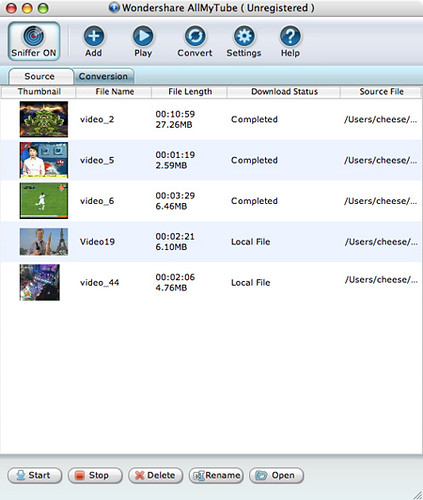
As a [**free youtube downloader for mac**](http://www.applemacvideo.com/free-mac-youtube-downloader.html), it can automatically detect and download online videos from YouTube.This [**youtube downloader mac**](http://www.applemacvideo.com/free-mac-youtube-downloader.html) is a totally free Mac YouTube video downloader and can play FLV videos on Mac. If you don't want to [**convert youtube mac**](http://www.applemacvideo.com/mac-youtube-downloader.html) downloaded videos to your mobile players, you don't have to pay for it.
How to convert youtube videos on mac?Using the [**mac youtube downloader**](http://www.applemacvideo.com/free-mac-youtube-downloader.html)
Free download youtube vides on mac with wondershare [**mac youtube downloader**](http://www.applemacvideo.com/free-mac-youtube-downloader.html) AllMytube for mac .
Since the yotube videos can be sd videos or hd videos,this [**youtube converter for mac**](http://www.applemacvideo.com/mac-youtube-downloader.html) is designed to deal with both sd and hd videos conversions with good quality. With the sniffer button on, you can download automatically. and then you can [**convert youtube mac**](http://www.applemacvideo.com/mac-youtube-downloader.html) to your devices like ipod ,blackberry,iphone etc on.
Want to download and watch youtube movies and videos sharing with your family with this [**mac youtube downloader**](http://www.applemacvideo.com/free-mac-youtube-downloader.html)?
This all in one [**youtube downloader mac**](http://www.applemacvideo.com/free-mac-youtube-downloader.html) and converter for mac is the best youtube tools for you.Since many of the videos downloaded from youtube are videos of flv formats.The wondershare allmytube is a best [**youtube converter for mac**](http://www.applemacvideo.com/mac-youtube-downloader.html).
After the process to [**convert youtube videos mac**](http://www.applemacvideo.com/mac-youtube-downloader.html) ,you can play youtube videos with wondershare Free Youtube Downloader for Mac,which is a free flv player for mac.Moreover,the youtube flv can be converted to various formats for different devices and portable players .Then, you can put the converted youtube videos on mac to apple tv ,iphone ,ipod ,ipod nano,psp,blackberry to enjoy at ease with the [**mac youtube downloader**](http://www.applemacvideo.com/free-mac-youtube-downloader.html)!
To [**convert youtube videos mac**](http://www.applemacvideo.com/mac-youtube-downloader.html) and free [**download youtube videos mac**](http://www.applemacvideo.com/free-mac-youtube-downloader.html),you won't regret to grasp the chance to get wondershare [**mac youtube downloader**](http://www.applemacvideo.com/free-mac-youtube-downloader.html) AllMyTube!
Tags:[convert youtube videos mac](http://www.applemacvideo.com/mac-youtube-downloader.html)|[youtube mac downloader](http://www.applemacvideo.com/free-mac-youtube-downloader.html)|
[download youtube videos for mac](http://www.applemacvideo.com/free-mac-youtube-downloader.html)|[youtube video downloader mac](http://www.applemacvideo.com/free-mac-youtube-downloader.html)|[youtube converter mac](http://www.applemacvideo.com/mac-youtube-downloader.html)|[YouTubeDownloader mac](http://www.applemacvideo.com/free-mac-youtube-downloader.html)|[download youtube videos on mac](http://www.applemacvideo.com/free-mac-youtube-downloader.html)|[convert youtube videos mac](http://www.applemacvideo.com/mac-youtube-downloader.html)|[youtube video downloader for mac](http://www.applemacvideo.com/free-mac-youtube-downloader.html)|[youtube converter for mac](http://www.applemacvideo.com/mac-youtube-downloader.html)|[youtubedownloader for mac](http://www.applemacvideo.com/free-mac-youtube-downloader.html)|[youtube ripper for mac](http://www.applemacvideo.com/mac-youtube-downloader.html)|[youtube video downloader for mac](http://www.applemacvideo.com/free-mac-youtube-downloader.html)12:["$","div","79120931226006",{"className":"border-l-4 border-gray-200 pl-4","children":[["$","div",null,{"className":"flex items-center gap-2 mb-2","children":["$","address",null,{"className":"flex items-center mb-6 not-italic","children":["$","div",null,{"className":"inline-flex items-center text-sm text-gray-900 dark:text-white","children":[["$","img",null,{"className":"mr-3 w-8 h-8 rounded-full","src":"$14","alt":"chieh"}],["$","a",null,{"href":"/author/chieh_73656910741910","rel":"author","className":"font-bold capitalize hover:underline dark:text-white","children":"chieh"}],["$","span",null,{"className":"mx-1 text-md text-gray-400 dark:text-gray-500","children":"·"}],"$undefined",["$","span",null,{"className":"mx-1 text-md text-gray-400 dark:text-gray-500","children":"·"}],["$","time",null,{"dateTime":"Fri Oct 15 2010","className":"text-gray-500 dark:text-gray-400","children":"Oct 15, 2010"}],"$undefined"]}]}]}],["$","p",null,{"className":"text-gray-700","children":"$15"}],"$L16"]}]
17:T40f,data:image/svg+xml;utf8,%3Csvg%20width%3D%2232%22%20height%3D%2232%22%20viewBox%3D%220%200%2032%2032%22%20%0A%20%20%20%20%20%20%20%20%20xmlns%3D%22http%3A%2F%2Fwww.w3.org%2F2000%2Fsvg%22%20role%3D%22img%22%20aria-label%3D%22Avatar%20for%20chieh%22%3E%0A%20%20%20%20%20%20%3Crect%20width%3D%22100%25%22%20height%3D%22100%25%22%20fill%3D%22hsl(303%2C%2073%25%2C%2053%25)%22%20rx%3D%223.2%22%20%2F%3E%0A%20%20%20%20%20%20%3Ctext%20x%3D%2250%25%22%20y%3D%2250%25%22%20%0A%20%20%20%20%20%20%20%20%20%20%20%20font-family%3D%22sans-serif%22%20%0A%20%20%20%20%20%20%20%20%20%20%20%20font-size%3D%2212.8%22%20%0A%20%20%20%20%20%20%20%20%20%20%20%20font-weight%3D%22bold%22%20%0A%20%20%20%20%20%20%20%20%20%20%20%20fill%3D%22%23FFFFFF%22%20%0A%20%20%20%20%20%20%20%20%20%20%20%20text-anchor%3D%22middle%22%20%0A%20%20%20%20%20%20%20%20%20%20%20%20dominant-baseline%3D%22central%22%0A%20%20%20%20%20%20%20%20%20%20%20%20style%3D%22user-select%3A%20none%3B%22%3E%0A%20%20%20%20%20%20%20%20C%0A%20%20%20%20%20%20%3C%2Ftext%3E%0A%20%20%20%20%3C%2Fsvg%3E18:T110a,How to convert mp4 files to dvd for dvd player: Nowadays, more and more movies and videos are encoded in the MP4 (MPEG-4) file format which could deliver good video quality. Downloaded MP4 videos and watch them on computer could be easy. But it's the only way that you can view MP4 files-on computer. Well, actually you can view MP4 files on normal stand-alone DVD players by converting and burning MP4 to DVD format. Remember just copy MP4 (MPEG-4) files to a DVD disc will not be played on most DVD players.
[**mp4 to dvd burner**](http://www.wonderdvd.com/tutorials/convert-burn-mp4-files-to-dvd.html) is an easy-to-use yet powerful [**mp4 to dvd converter**](http://www.wonderdvd.com/tutorials/convert-burn-mp4-files-to-dvd.html) which allows you to [**convert mp4 to dvd**](http://www.wonderdvd.com/tutorials/convert-burn-mp4-files-to-dvd.html) and [**burn mp4 to dvd**](http://www.wonderdvd.com/tutorials/convert-burn-mp4-files-to-dvd.html) which then you can play them on your DVD player and watch them on TV, sitting on couch comfortably. This tutorial will show you how to [**converter mpeg4 to dvd**](http://www.wonderdvd.com/tutorials/convert-burn-mp4-files-to-dvd.html) playable easily. Keep reading and make the most of your MP4 video files.
Install and launch Wondershare [**mp4 to dvd burner**](http://www.wonderdvd.com/tutorials/convert-burn-mp4-files-to-dvd.html)!
[**mp4 to dvd**](http://www.wonderdvd.com/tutorials/convert-burn-mp4-files-to-dvd.html) Step 1. Load MP4 (MPEG-4) video files. Click the 'Load Video' button to load the MP4 video files you want to burn.
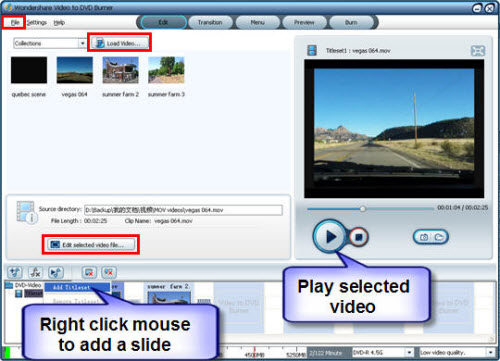
[**mpeg4 to dvd**](http://www.wonderdvd.com/tutorials/convert-burn-mp4-files-to-dvd.html) Step 2. Edit videos. Select a loaded MPEG video in the storyboard, click "edit selected video file", There are five tabs here for you to crop the size, to trim the length, to adjust the video effect, to design your watermark and to plug-in subtitle.
[**mpeg 4 to dvd**](http://www.wonderdvd.com/tutorials/convert-burn-mp4-files-to-dvd.html) Step 3. Add transition effects. Just drag and drop the transition effect you want to apply to the middle of two video files in the slideshow storyboard.

[**.mp4 to dvd**](http://www.wonderdvd.com/tutorials/convert-burn-mp4-files-to-dvd.html) Step 4. Customize DVD menu. Click "Menu" to customize your DVD menu. There are different styles of built-in templates, frames and buttons for your choice. To apply a template, frame or button, you can just double click it. You can even add text, background music and background image to customize the menu.

[**mpeg-4 to dvd**](http://www.wonderdvd.com/tutorials/convert-burn-mp4-files-to-dvd.html) Step 5. Start [**burning mp4 to dvd**](http://www.wonderdvd.com/tutorials/convert-burn-mp4-files-to-dvd.html).
NOTE: Fore more details on MP4 to DVD conversion tutorial, please follow [**How to convert mp4 to dvd format**](http://www.wonderdvd.com/tutorials/convert-burn-mp4-files-to-dvd.html).
Tags:
[**mpeg-4 to dvd**](http://www.wonderdvd.com/tutorials/convert-burn-mp4-files-to-dvd.html); [**convert mpeg-4 to dvd**](http://www.wonderdvd.com/tutorials/convert-burn-mp4-files-to-dvd.html); [**how to convert mpeg 4 to dvd**](http://www.wonderdvd.com/tutorials/convert-burn-mp4-files-to-dvd.html); [**converting mp4 to dvd**](http://www.wonderdvd.com/tutorials/convert-burn-mp4-files-to-dvd.html); [**burn mpeg4 to dvd**](http://www.wonderdvd.com/tutorials/convert-burn-mp4-files-to-dvd.html); [**convert mpeg 4 to dvd formats**](http://www.wonderdvd.com/tutorials/convert-burn-mp4-files-to-dvd.html); [**mpeg4 to dvd**](http://www.wonderdvd.com/tutorials/convert-burn-mp4-files-to-dvd.html); [**convert mpeg-4 to dvd**](http://www.wonderdvd.com/tutorials/convert-burn-mp4-files-to-dvd.html); [**how to burn mp4 to dvd**](http://www.wonderdvd.com/tutorials/convert-burn-mp4-files-to-dvd.html); [**mpeg-4 to dvd converter**](http://www.wonderdvd.com/tutorials/convert-burn-mp4-files-to-dvd.html); [**burn mp4 for dvd player**](http://www.wonderdvd.com/tutorials/convert-burn-mp4-files-to-dvd.html)13:["$","div","79089272619414",{"className":"border-l-4 border-gray-200 pl-4","children":[["$","div",null,{"className":"flex items-center gap-2 mb-2","children":["$","address",null,{"className":"flex items-center mb-6 not-italic","children":["$","div",null,{"className":"inline-flex items-center text-sm text-gray-900 dark:text-white","children":[["$","img",null,{"className":"mr-3 w-8 h-8 rounded-full","src":"$17","alt":"chieh"}],["$","a",null,{"href":"/author/chieh_73656910741910","rel":"author","className":"font-bold capitalize hover:underline dark:text-white","children":"chieh"}],["$","span",null,{"className":"mx-1 text-md text-gray-400 dark:text-gray-500","children":"·"}],"$undefined",["$","span",null,{"className":"mx-1 text-md text-gray-400 dark:text-gray-500","children":"·"}],["$","time",null,{"dateTime":"Thu Sep 02 2010","className":"text-gray-500 dark:text-gray-400","children":"Sep 2, 2010"}],"$undefined"]}]}]}],["$","p",null,{"className":"text-gray-700","children":"$18"}],"$L19"]}]
16:["$","div",null,{"className":"flex items-center mt-4 space-x-4","children":["$","button",null,{"type":"button","className":"flex items-center font-medium text-sm text-gray-500 hover:underline dark:text-gray-400","children":[["$","svg",null,{"className":"mr-1.5 w-3 h-3","aria-hidden":"true","xmlns":"http://www.w3.org/2000/svg","fill":"currentColor","viewBox":"0 0 20 18","children":["$","path",null,{"d":"M18 0H2a2 2 0 0 0-2 2v9a2 2 0 0 0 2 2h2v4a1 1 0 0 0 1.707.707L10.414 13H18a2 2 0 0 0 2-2V2a2 2 0 0 0-2-2Zm-5 4h2a1 1 0 1 1 0 2h-2a1 1 0 1 1 0-2ZM5 4h5a1 1 0 1 1 0 2H5a1 1 0 0 1 0-2Zm2 5H5a1 1 0 0 1 0-2h2a1 1 0 0 1 0 2Zm9 0h-6a1 1 0 0 1 0-2h6a1 1 0 1 1 0 2Z"}]}],"Reply"]}]}]
19:["$","div",null,{"className":"flex items-center mt-4 space-x-4","children":["$","button",null,{"type":"button","className":"flex items-center font-medium text-sm text-gray-500 hover:underline dark:text-gray-400","children":[["$","svg",null,{"className":"mr-1.5 w-3 h-3","aria-hidden":"true","xmlns":"http://www.w3.org/2000/svg","fill":"currentColor","viewBox":"0 0 20 18","children":["$","path",null,{"d":"M18 0H2a2 2 0 0 0-2 2v9a2 2 0 0 0 2 2h2v4a1 1 0 0 0 1.707.707L10.414 13H18a2 2 0 0 0 2-2V2a2 2 0 0 0-2-2Zm-5 4h2a1 1 0 1 1 0 2h-2a1 1 0 1 1 0-2ZM5 4h5a1 1 0 1 1 0 2H5a1 1 0 0 1 0-2Zm2 5H5a1 1 0 0 1 0-2h2a1 1 0 0 1 0 2Zm9 0h-6a1 1 0 0 1 0-2h6a1 1 0 1 1 0 2Z"}]}],"Reply"]}]}]