0:{"root":[["$","meta","1",{"property":"csp-nonce","nonce":"7ddec99d-5dfa-4ec8-801b-6828dcf32205"}],"$L1"],"formState":"$undefined","returnValue":"$undefined"}
2:"$Sreact.fragment"
3:I["7ada5cab5be8",[],"Header",1]
4:"$Sreact.suspense"
:HL["/assets/_layout-BzYdn0f6.css","stylesheet"]
1:["$","$2","2",{"children":[[["$","link","css:/assets/_layout-BzYdn0f6.css",{"rel":"stylesheet","precedence":"vite-rsc/importer-resources","href":"/assets/_layout-BzYdn0f6.css","data-rsc-css-href":"/assets/_layout-BzYdn0f6.css"}],"$undefined"],["$","html",null,{"lang":"en","className":"$undefined","children":[["$","head",null,{"children":[["$","meta",null,{"charSet":"UTF-8"}],["$","meta",null,{"name":"viewport","content":"width=device-width, initial-scale=1.0"}],["$","link",null,{"rel":"icon","type":"image/png","href":"/static/icons/apple-icon.png"}],["$","link",null,{"rel":"icon","type":"image/png","sizes":"32x32","href":"/static/icons/favicon-32x32.png"}],["$","link",null,{"rel":"apple-touch-icon","href":"/static/icons/apple-icon.png"}],["$","meta",null,{"name":"theme-color","content":"#1e40af"}],["$","meta",null,{"name":"language","content":"en_US"}],["$","meta",null,{"httpEquiv":"content-language","content":"en_US"}]]}],["$","body",null,{"className":"min-h-screen flex flex-col","children":[["$","$L3",null,{}],["$","main",null,{"className":"main-content grow bg-gray-100","children":["$","$4",null,{"fallback":[[["$","link","css:/assets/_layout-BzYdn0f6.css",{"rel":"stylesheet","precedence":"vite-rsc/importer-resources","href":"/assets/_layout-BzYdn0f6.css","data-rsc-css-href":"/assets/_layout-BzYdn0f6.css"}],"$undefined"],["$","div",null,{"className":"flex justify-center items-center p-8","children":["$","div",null,{"className":"animate-spin rounded-full h-8 w-8 border-b-2 border-indigo-600"}]}]],"children":[[["$","title",null,{"children":"MacWindows MP4 Converter Guide how to convert video to MP4 format | Gleez"}],["$","meta",null,{"name":"description","content":"MP4 video format is a very popular video format right now. Actually, MP4 file is multimedia file, which is a container format that can store video, audio…"}],["$","meta",null,{"name":"keywords","content":"macwindows, mp4, converter, guide, how, convert, video, format, Gleez, privacy, secure productivity"}],["$","meta",null,{"name":"author","content":"ailisaone"}],["$","meta",null,{"property":"og:title","content":"MacWindows MP4 Converter Guide how to convert video to MP4 format | Gleez"}],["$","meta",null,{"property":"og:description","content":"MP4 video format is a very popular video format right now. Actually, MP4 file is multimedia file, which is a container format that can store video, audio…"}],["$","meta",null,{"property":"og:type","content":"article"}],["$","meta",null,{"property":"og:url","content":"https://gleez.com/s/mac-windows-mp4-converter-guide-how-to-convert-video-to-mp4-format"}],["$","meta",null,{"property":"og:image","content":"/static/og.png"}],["$","meta",null,{"property":"og:image:alt","content":"MacWindows MP4 Converter Guide how to convert video to MP4 format"}],["$","meta",null,{"property":"og:site_name","content":"Gleez"}],["$","meta",null,{"property":"og:locale","content":"en_US"}],["$","meta",null,{"property":"article:published_time","content":"2009-06-18T08:21:08.000Z"}],["$","meta",null,{"property":"article:modified_time","content":"2018-12-31T17:59:36.000Z"}],["$","meta",null,{"property":"article:author","content":"https://gleez.com/author/73462714466710"}],[],["$","meta",null,{"name":"twitter:card","content":"summary_large_image"}],["$","meta",null,{"name":"twitter:title","content":"MacWindows MP4 Converter Guide how to convert video to MP4 format | Gleez"}],["$","meta",null,{"name":"twitter:description","content":"MP4 video format is a very popular video format right now. Actually, MP4 file is multimedia file, which is a container format that can store video, audio…"}],["$","meta",null,{"name":"twitter:image","content":"/static/og.png"}],["$","meta",null,{"name":"twitter:image:alt","content":"MacWindows MP4 Converter Guide how to convert video to MP4 format"}],["$","meta",null,{"name":"twitter:site","content":"@gleeztech"}],["$","meta",null,{"name":"twitter:creator","content":"@gleeztech"}],["$","link",null,{"rel":"canonical","href":"https://gleez.com/s/mac-windows-mp4-converter-guide-how-to-convert-video-to-mp4-format"}],["$","meta",null,{"name":"robots","content":"index, follow"}],["$","meta",null,{"name":"googlebot","content":"index, follow, max-snippet:-1, max-image-preview:large"}],"$L5"],"$L6"]}]}],"$L7"]}]]}]]}]
5:["$","script",null,{"type":"application/ld+json","dangerouslySetInnerHTML":{"__html":"{\"@context\":\"https://schema.org\",\"@type\":\"BlogPosting\",\"headline\":\"MacWindows MP4 Converter Guide how to convert video to MP4 format\",\"description\":\"MP4 video format is a very popular video format right now. Actually, MP4 file is multimedia file, which is a container format that can store video, audio…\",\"image\":\"/static/og.png\",\"author\":{\"@type\":\"Person\",\"name\":\"ailisaone\"},\"publisher\":{\"@type\":\"Organization\",\"name\":\"Gleez\",\"logo\":{\"@type\":\"ImageObject\",\"url\":\"https://gleez.tech/static/logo-512.png\"}},\"datePublished\":\"2009-06-18T08:21:08.000Z\",\"dateModified\":\"2018-12-31T17:59:36.000Z\",\"mainEntityOfPage\":{\"@type\":\"WebPage\",\"@id\":\"https://gleez.com/s/mac-windows-mp4-converter-guide-how-to-convert-video-to-mp4-format\"}}"}}]
8:T413,data:image/svg+xml;utf8,%3Csvg%20width%3D%2232%22%20height%3D%2232%22%20viewBox%3D%220%200%2032%2032%22%20%0A%20%20%20%20%20%20%20%20%20xmlns%3D%22http%3A%2F%2Fwww.w3.org%2F2000%2Fsvg%22%20role%3D%22img%22%20aria-label%3D%22Avatar%20for%20ailisaone%22%3E%0A%20%20%20%20%20%20%3Crect%20width%3D%22100%25%22%20height%3D%22100%25%22%20fill%3D%22hsl(147%2C%2082%25%2C%2057%25)%22%20rx%3D%223.2%22%20%2F%3E%0A%20%20%20%20%20%20%3Ctext%20x%3D%2250%25%22%20y%3D%2250%25%22%20%0A%20%20%20%20%20%20%20%20%20%20%20%20font-family%3D%22sans-serif%22%20%0A%20%20%20%20%20%20%20%20%20%20%20%20font-size%3D%2212.8%22%20%0A%20%20%20%20%20%20%20%20%20%20%20%20font-weight%3D%22bold%22%20%0A%20%20%20%20%20%20%20%20%20%20%20%20fill%3D%22%23FFFFFF%22%20%0A%20%20%20%20%20%20%20%20%20%20%20%20text-anchor%3D%22middle%22%20%0A%20%20%20%20%20%20%20%20%20%20%20%20dominant-baseline%3D%22central%22%0A%20%20%20%20%20%20%20%20%20%20%20%20style%3D%22user-select%3A%20none%3B%22%3E%0A%20%20%20%20%20%20%20%20A%0A%20%20%20%20%20%20%3C%2Ftext%3E%0A%20%20%20%20%3C%2Fsvg%3E9:T1176,MP4 video format is a very popular video format right now. Actually, MP4 file is multimedia file, which is a container format that can store video, audio and
subtitle data. MP4 format is really popular because many stores like iTunes are using this container format, iPod and Playstation Portable (PSP) and other
popular devices support MP4 format.
This guide aims to show you how to convert videos to MP4 format on Windows and Mac.
For Windows:
To convert videos to MP4 format I use Aiseesoft MP4 Video Converter.
Its input video formats are really amazing.
It can decode MPG, MPEG, MPEG2, VOB, MP4, M4V, RM, RMVB, WMV, ASF, QT, TS, MKV, AVI, 3GP, FLV, MPV, MOD, TOD, MP3, MP2,
AAC, AC3, WAV, MID, MIDI, WMA, M4A, RA, RAM, HD video etc. and convert them into MP4 format.
It works perfectly with iPod iPhone, PSP, Creative Zen, Zune, Zune 2, iRiver PMP, Archos, PS3, Xbox, etc.
Step 1: Load Video
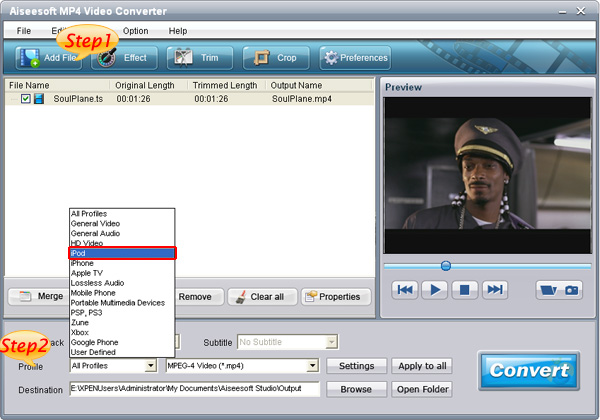
Click “Add File” to load the video that you want to convert to MP4 format to Aiseesoft MP4 Video Converter.
You can also do it by clicking “File” and choose “Add File”.
Step 2: Choose Your Output Profile and Settings
From “Profile” drop-down list you can choose your output profile according to your need.
For example, if you have a iPod and you want to convert video for it, you need to choose “iPod” from the profile list and then it also provides the second
chance to specify your iPod generation. You can choose “iPod touch”, “iPod nano” and other iPod generation.
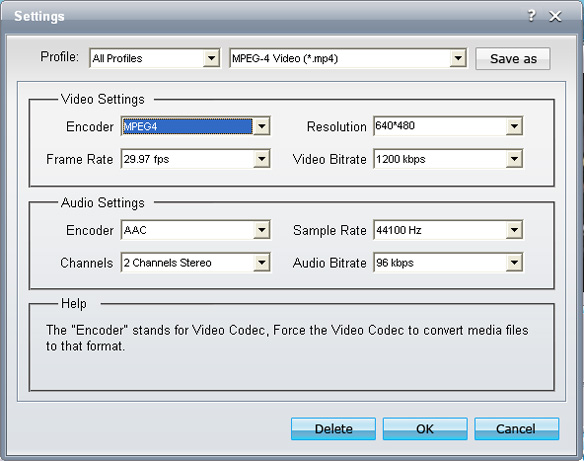
You can also adjust the settings of your output video, such as “video/audio encoder”, “Video/audio Bitrate”, “Channels”, “Resolution” and so on.
Step 3: Video Editing
This powerful MP4 video converter allows you to do many video editings.
1. Effect:
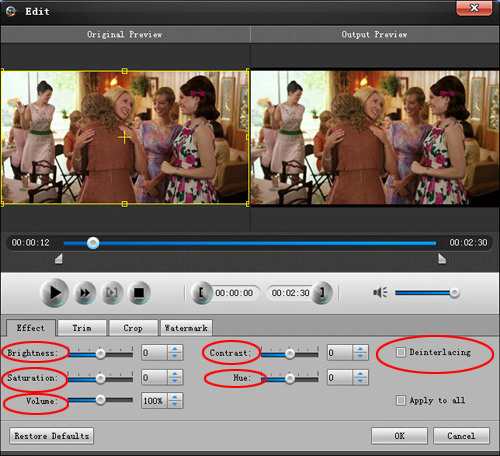
You can adjust the “Brightness”, “Contrast”, “Saturation” and also you can use “deinterlacing” to improve you output effect.
2. Trim:
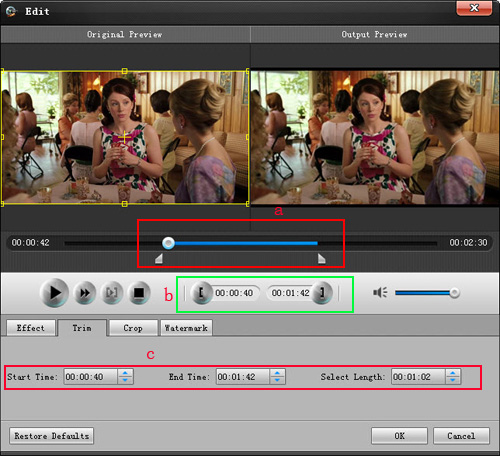
“Trim” function allows you to pick up any part of your video to convert. You can just convert a part of your video that you want.
There are 3 ways that you can trim your video.
a. You can drag the buttons to set the start and end time
b. You can preview the video first and when you want to start trim click the left one of the pair buttons when you want to end click the right one.
c. You can set the exact start and end time at the buttom of the pop-up window.
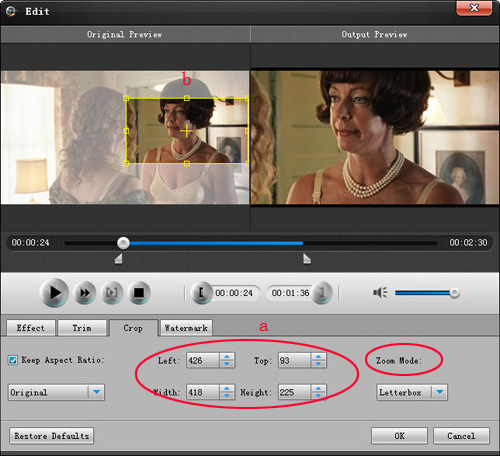
3: Crop:
“Crop” means to choose a certain play area to convert.
There are 2 ways that you can crop your video.
a. You can set your own mode on the bottom of the pop-up window
b. You can drag frame to set your own crop mode
Step 4: Conversion
After you have done all the steps above you can click “Start” button to start your conversion.
For Mac:
Mac users can also enjoy Mp4 video at will.
Here you just need Aiseesoft MP4 Video Converter for Mac.
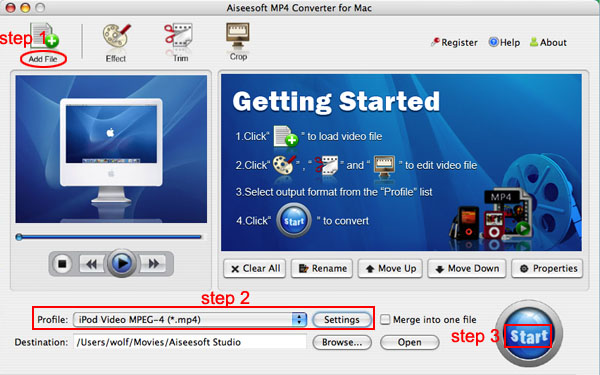
Step 1. Load Video
Click “Add File” to load the video/movie that you want to convert to MP4 format.
Step 2. Choose Profile and Settings
You can choose your output profile on a drop-down list.
Click “Settings” button you can adjust the details of your output video/movie
Step 3. Conversion
Everything is ready and you just need to click “Start” button to begin the conversion.
6:["$","$4",null,{"fallback":[[["$","link","css:/assets/_layout-BzYdn0f6.css",{"rel":"stylesheet","precedence":"vite-rsc/importer-resources","href":"/assets/_layout-BzYdn0f6.css","data-rsc-css-href":"/assets/_layout-BzYdn0f6.css"}],"$undefined"],["$","div",null,{"className":"flex justify-center items-center p-8","children":["$","div",null,{"className":"animate-spin rounded-full h-8 w-8 border-b-2 border-indigo-600"}]}]],"children":["$","div",null,{"className":"bg-white/95 mt-0.5 py-6 sm:py-12","children":["$","article",null,{"className":"mx-auto w-full max-w-2xl format format-sm sm:format-base lg:format-lg format-blue dark:format-invert","children":[["$","header",null,{"className":"mb-4 lg:mb-6 not-format","children":[["$","h1",null,{"className":"mb-4 text-3xl font-extrabold leading-tight text-gray-900 lg:mb-6 lg:text-4xl dark:text-white","children":"Mac/Windows MP4 Converter Guide: how to convert video to MP4 format?"}],["$","address",null,{"className":"flex items-center mb-6 not-italic","children":["$","div",null,{"className":"inline-flex items-center text-sm text-gray-900 dark:text-white","children":[["$","img",null,{"className":"mr-3 w-8 h-8 rounded-full","src":"$8","alt":"ailisaone"}],["$","a",null,{"href":"/author/ailisaone_73462714466710","rel":"author","className":"font-bold capitalize hover:underline dark:text-white","children":"ailisaone"}],["$","span",null,{"className":"mx-1 text-md text-gray-400 dark:text-gray-500","children":"·"}],["$","span",null,{"className":"inline-flex items-center ml-1 text-gray-500 dark:text-gray-400","children":"3 min read"}],["$","span",null,{"className":"mx-1 text-md text-gray-400 dark:text-gray-500","children":"·"}],["$","time",null,{"dateTime":"Thu Jun 18 2009","className":"text-gray-500 dark:text-gray-400","children":"Jun 18, 2009"}],[["$","span",null,{"className":"mx-1 text-md text-gray-400 dark:text-gray-500","children":"·"}],["$","a","general",{"href":"/t/general","className":"capitalize text-sm text-gray-500 dark:text-gray-400 hover:text-gray-600","children":"general"}]]]}]}]]}],["$","div",null,{"className":"lead prose mt-4 text-lg leading-8 text-gray-600","children":["$","div",null,{"dangerouslySetInnerHTML":{"__html":"$9"}}]}],"$La","$Lb"]}]}]}]
c:T63b,M12.315 2c2.43 0 2.784.013 3.808.06 1.064.049 1.791.218 2.427.465a4.902 4.902 0 011.772 1.153 4.902 4.902 0 011.153 1.772c.247.636.416 1.363.465 2.427.048 1.067.06 1.407.06 4.123v.08c0 2.643-.012 2.987-.06 4.043-.049 1.064-.218 1.791-.465 2.427a4.902 4.902 0 01-1.153 1.772 4.902 4.902 0 01-1.772 1.153c-.636.247-1.363.416-2.427.465-1.067.048-1.407.06-4.123.06h-.08c-2.643 0-2.987-.012-4.043-.06-1.064-.049-1.791-.218-2.427-.465a4.902 4.902 0 01-1.772-1.153 4.902 4.902 0 01-1.153-1.772c-.247-.636-.416-1.363-.465-2.427-.047-1.024-.06-1.379-.06-3.808v-.63c0-2.43.013-2.784.06-3.808.049-1.064.218-1.791.465-2.427a4.902 4.902 0 011.153-1.772A4.902 4.902 0 015.45 2.525c.636-.247 1.363-.416 2.427-.465C8.901 2.013 9.256 2 11.685 2h.63zm-.081 1.802h-.468c-2.456 0-2.784.011-3.807.058-.975.045-1.504.207-1.857.344-.467.182-.8.398-1.15.748-.35.35-.566.683-.748 1.15-.137.353-.3.882-.344 1.857-.047 1.023-.058 1.351-.058 3.807v.468c0 2.456.011 2.784.058 3.807.045.975.207 1.504.344 1.857.182.466.399.8.748 1.15.35.35.683.566 1.15.748.353.137.882.3 1.857.344 1.054.048 1.37.058 4.041.058h.08c2.597 0 2.917-.01 3.96-.058.976-.045 1.505-.207 1.858-.344.466-.182.8-.398 1.15-.748.35-.35.566-.683.748-1.15.137-.353.3-.882.344-1.857.048-1.055.058-1.37.058-4.041v-.08c0-2.597-.01-2.917-.058-3.96-.045-.976-.207-1.505-.344-1.858a3.097 3.097 0 00-.748-1.15 3.098 3.098 0 00-1.15-.748c-.353-.137-.882-.3-1.857-.344-1.023-.047-1.351-.058-3.807-.058zM12 6.865a5.135 5.135 0 110 10.27 5.135 5.135 0 010-10.27zm0 1.802a3.333 3.333 0 100 6.666 3.333 3.333 0 000-6.666zm5.338-3.205a1.2 1.2 0 110 2.4 1.2 1.2 0 010-2.4z7:["$","footer",null,{"className":"bg-gray-900 dark:bg-gray-900","children":["$","div",null,{"className":"mx-auto max-w-7xl px-6 py-4.5 md:flex md:items-center md:justify-between lg:px-8","children":[["$","div",null,{"className":"flex justify-center space-x-6 md:order-2","children":[["$","a","Facebook",{"href":"https://facebook.com/gleeztech","target":"_blank","rel":"noopener noreferrer","className":"text-gray-400 hover:text-gray-500","children":[["$","span",null,{"className":"sr-only","children":"Facebook"}],["$","svg",null,{"className":"h-6 w-6","fill":"currentColor","viewBox":"0 0 24 24","aria-hidden":"true","children":["$","path",null,{"fillRule":"evenodd","d":"M22 12c0-5.523-4.477-10-10-10S2 6.477 2 12c0 4.991 3.657 9.128 8.438 9.878v-6.987h-2.54V12h2.54V9.797c0-2.506 1.492-3.89 3.777-3.89 1.094 0 2.238.195 2.238.195v2.46h-1.26c-1.243 0-1.63.771-1.63 1.562V12h2.773l-.443 2.89h-2.33v6.988C18.343 21.128 22 16.991 22 12z","clipRule":"evenodd"}]}]]}],["$","a","Instagram",{"href":"https://instagram.com/gleeztech","target":"_blank","rel":"noopener noreferrer","className":"text-gray-400 hover:text-gray-500","children":[["$","span",null,{"className":"sr-only","children":"Instagram"}],["$","svg",null,{"className":"h-6 w-6","fill":"currentColor","viewBox":"0 0 24 24","aria-hidden":"true","children":["$","path",null,{"fillRule":"evenodd","d":"$c","clipRule":"evenodd"}]}]]}],["$","a","X",{"href":"https://x.com/gleeztech","target":"_blank","rel":"noopener noreferrer","className":"text-gray-400 hover:text-gray-500","children":[["$","span",null,{"className":"sr-only","children":"X"}],["$","svg",null,{"className":"h-6 w-6","fill":"currentColor","viewBox":"0 0 24 24","aria-hidden":"true","children":["$","path",null,{"d":"M13.6823 10.6218L20.2391 3H18.6854L12.9921 9.61788L8.44486 3H3.2002L10.0765 13.0074L3.2002 21H4.75404L10.7663 14.0113L15.5685 21H20.8131L13.6819 10.6218H13.6823ZM11.5541 13.0956L10.8574 12.0991L5.31391 4.16971H7.70053L12.1742 10.5689L12.8709 11.5655L18.6861 19.8835H16.2995L11.5541 13.096V13.0956Z"}]}]]}],"$Ld"]}],"$Le"]}]}]
a:null
b:["$","$4",null,{"fallback":["$","div",null,{"className":"comments-skeleton","children":[["$","div",null,{"className":"h-6 bg-gray-200 rounded w-32 mb-4 animate-pulse"}],["$","div",null,{"className":"space-y-3","children":[["$","div","1",{"className":"h-16 bg-gray-100 rounded animate-pulse"}],["$","div","2",{"className":"h-16 bg-gray-100 rounded animate-pulse"}],["$","div","3",{"className":"h-16 bg-gray-100 rounded animate-pulse"}]]}]]}],"children":"$Lf"}]
d:["$","a","GitHub",{"href":"https://github.com/gleez","target":"_blank","rel":"noopener noreferrer","className":"text-gray-400 hover:text-gray-500","children":[["$","span",null,{"className":"sr-only","children":"GitHub"}],["$","svg",null,{"className":"h-6 w-6","fill":"currentColor","viewBox":"0 0 24 24","aria-hidden":"true","children":["$","path",null,{"fillRule":"evenodd","d":"M12 2C6.477 2 2 6.484 2 12.017c0 4.425 2.865 8.18 6.839 9.504.5.092.682-.217.682-.483 0-.237-.008-.868-.013-1.703-2.782.605-3.369-1.343-3.369-1.343-.454-1.158-1.11-1.466-1.11-1.466-.908-.62.069-.608.069-.608 1.003.07 1.531 1.032 1.531 1.032.892 1.53 2.341 1.088 2.91.832.092-.647.35-1.088.636-1.338-2.22-.253-4.555-1.113-4.555-4.951 0-1.093.39-1.988 1.029-2.688-.103-.253-.446-1.272.098-2.65 0 0 .84-.27 2.75 1.026A9.564 9.564 0 0112 6.844c.85.004 1.705.115 2.504.337 1.909-1.296 2.747-1.027 2.747-1.027.546 1.379.202 2.398.1 2.651.64.7 1.028 1.595 1.028 2.688 0 3.848-2.339 4.695-4.566 4.943.359.309.678.92.678 1.855 0 1.338-.012 2.419-.012 2.747 0 .268.18.58.688.482A10.019 10.019 0 0022 12.017C22 6.484 17.522 2 12 2z","clipRule":"evenodd"}]}]]}]
e:["$","div",null,{"className":"mt-8 md:order-1 md:mt-0","children":["$","p",null,{"className":"text-sm leading-5 text-gray-400","children":["© 2005 - ",2026," Gleez Inc. All rights reserved."]}]}]
10:T414,data:image/svg+xml;utf8,%3Csvg%20width%3D%2232%22%20height%3D%2232%22%20viewBox%3D%220%200%2032%2032%22%20%0A%20%20%20%20%20%20%20%20%20xmlns%3D%22http%3A%2F%2Fwww.w3.org%2F2000%2Fsvg%22%20role%3D%22img%22%20aria-label%3D%22Avatar%20for%20Rosaura1234%22%3E%0A%20%20%20%20%20%20%3Crect%20width%3D%22100%25%22%20height%3D%22100%25%22%20fill%3D%22hsl(11%2C%2081%25%2C%2051%25)%22%20rx%3D%223.2%22%20%2F%3E%0A%20%20%20%20%20%20%3Ctext%20x%3D%2250%25%22%20y%3D%2250%25%22%20%0A%20%20%20%20%20%20%20%20%20%20%20%20font-family%3D%22sans-serif%22%20%0A%20%20%20%20%20%20%20%20%20%20%20%20font-size%3D%2212.8%22%20%0A%20%20%20%20%20%20%20%20%20%20%20%20font-weight%3D%22bold%22%20%0A%20%20%20%20%20%20%20%20%20%20%20%20fill%3D%22%23FFFFFF%22%20%0A%20%20%20%20%20%20%20%20%20%20%20%20text-anchor%3D%22middle%22%20%0A%20%20%20%20%20%20%20%20%20%20%20%20dominant-baseline%3D%22central%22%0A%20%20%20%20%20%20%20%20%20%20%20%20style%3D%22user-select%3A%20none%3B%22%3E%0A%20%20%20%20%20%20%20%20R%0A%20%20%20%20%20%20%3C%2Ftext%3E%0A%20%20%20%20%3C%2Fsvg%3E11:T411,data:image/svg+xml;utf8,%3Csvg%20width%3D%2232%22%20height%3D%2232%22%20viewBox%3D%220%200%2032%2032%22%20%0A%20%20%20%20%20%20%20%20%20xmlns%3D%22http%3A%2F%2Fwww.w3.org%2F2000%2Fsvg%22%20role%3D%22img%22%20aria-label%3D%22Avatar%20for%20crisbmw%22%3E%0A%20%20%20%20%20%20%3Crect%20width%3D%22100%25%22%20height%3D%22100%25%22%20fill%3D%22hsl(123%2C%2073%25%2C%2053%25)%22%20rx%3D%223.2%22%20%2F%3E%0A%20%20%20%20%20%20%3Ctext%20x%3D%2250%25%22%20y%3D%2250%25%22%20%0A%20%20%20%20%20%20%20%20%20%20%20%20font-family%3D%22sans-serif%22%20%0A%20%20%20%20%20%20%20%20%20%20%20%20font-size%3D%2212.8%22%20%0A%20%20%20%20%20%20%20%20%20%20%20%20font-weight%3D%22bold%22%20%0A%20%20%20%20%20%20%20%20%20%20%20%20fill%3D%22%23FFFFFF%22%20%0A%20%20%20%20%20%20%20%20%20%20%20%20text-anchor%3D%22middle%22%20%0A%20%20%20%20%20%20%20%20%20%20%20%20dominant-baseline%3D%22central%22%0A%20%20%20%20%20%20%20%20%20%20%20%20style%3D%22user-select%3A%20none%3B%22%3E%0A%20%20%20%20%20%20%20%20C%0A%20%20%20%20%20%20%3C%2Ftext%3E%0A%20%20%20%20%3C%2Fsvg%3Ef:["$","div",null,{"className":"mt-8","children":[["$","h3",null,{"className":"text-xl font-semibold mb-4","children":["Voices (",13,")"]}],["$","div",null,{"className":"space-y-6","children":[[["$","div","79278586724758",{"className":"border-l-4 border-gray-200 pl-4","children":[["$","div",null,{"className":"flex items-center gap-2 mb-2","children":["$","address",null,{"className":"flex items-center mb-6 not-italic","children":["$","div",null,{"className":"inline-flex items-center text-sm text-gray-900 dark:text-white","children":[["$","img",null,{"className":"mr-3 w-8 h-8 rounded-full","src":"$10","alt":"Rosaura1234"}],["$","a",null,{"href":"/author/rosaura1234_74553720045974","rel":"author","className":"font-bold capitalize hover:underline dark:text-white","children":"Rosaura1234"}],["$","span",null,{"className":"mx-1 text-md text-gray-400 dark:text-gray-500","children":"·"}],"$undefined",["$","span",null,{"className":"mx-1 text-md text-gray-400 dark:text-gray-500","children":"·"}],["$","time",null,{"dateTime":"Tue Oct 16 2012","className":"text-gray-500 dark:text-gray-400","children":"Oct 16, 2012"}],"$undefined"]}]}]}],["$","p",null,{"className":"text-gray-700","children":"I have been used to convert videos to mp4 such: I have been used to convert videos to mp4 such as mp4 to final cut pro using [leawo video converter](http://www.leawo.com/leawo-video-converter/), and I read this article and found that this one is good, too.But I just don' t know which one is better."}],["$","div",null,{"className":"flex items-center mt-4 space-x-4","children":["$","button",null,{"type":"button","className":"flex items-center font-medium text-sm text-gray-500 hover:underline dark:text-gray-400","children":[["$","svg",null,{"className":"mr-1.5 w-3 h-3","aria-hidden":"true","xmlns":"http://www.w3.org/2000/svg","fill":"currentColor","viewBox":"0 0 20 18","children":["$","path",null,{"d":"M18 0H2a2 2 0 0 0-2 2v9a2 2 0 0 0 2 2h2v4a1 1 0 0 0 1.707.707L10.414 13H18a2 2 0 0 0 2-2V2a2 2 0 0 0-2-2Zm-5 4h2a1 1 0 1 1 0 2h-2a1 1 0 1 1 0-2ZM5 4h5a1 1 0 1 1 0 2H5a1 1 0 0 1 0-2Zm2 5H5a1 1 0 0 1 0-2h2a1 1 0 0 1 0 2Zm9 0h-6a1 1 0 0 1 0-2h6a1 1 0 1 1 0 2Z"}]}],"Reply"]}]}]]}],["$","div","79075917955478",{"className":"border-l-4 border-gray-200 pl-4","children":[["$","div",null,{"className":"flex items-center gap-2 mb-2","children":["$","address",null,{"className":"flex items-center mb-6 not-italic","children":["$","div",null,{"className":"inline-flex items-center text-sm text-gray-900 dark:text-white","children":[["$","img",null,{"className":"mr-3 w-8 h-8 rounded-full","src":"$11","alt":"crisbmw"}],"$L12","$L13","$undefined","$L14","$L15","$undefined"]}]}]}],"$L16","$L17"]}],"$L18","$L19","$L1a"],"$L1b"]}]]}]
20:I["1715fab9d5d1",[],"default",1]
12:["$","a",null,{"href":"/author/crisbmw_73636794859926","rel":"author","className":"font-bold capitalize hover:underline dark:text-white","children":"crisbmw"}]
13:["$","span",null,{"className":"mx-1 text-md text-gray-400 dark:text-gray-500","children":"·"}]
14:["$","span",null,{"className":"mx-1 text-md text-gray-400 dark:text-gray-500","children":"·"}]
15:["$","time",null,{"dateTime":"Tue Aug 17 2010","className":"text-gray-500 dark:text-gray-400","children":"Aug 17, 2010"}]
1c:Teef,How to import MOD to Final Cut Pro for Mac (Snow Leopard include: Abstract: what is Final Cut Pro? The article tells you something about Final Cut Pro and tips on how to import [**mod to fcp**](http://www.applemacvideo.com/fcpmac/convert-mod-to-fcp-mac.html) for edit. At last, some MOD camcorders are listed.
What’s Final Cut Pro? See [**mod to fcp mac**](http://www.applemacvideo.com/fcpmac/convert-mod-to-fcp-mac.html) converter.
Famous Camcorder Companies such as Canon, Panasonic and JVC have released camcorder models that store SD videos in MOD (MPEG2) video format. However, original MOD videos can’t be imported to Final Cut Pro. Many Mac users have proved this voice via the main famous Mac forum.
How to [**import mod to fcp**](http://www.applemacvideo.com/fcpmac/convert-mod-to-fcp-mac.html) for Mac?
This [**mod to fcp mac**](http://www.applemacvideo.com/fcpmac/convert-mod-to-fcp-mac.html) converter can original [**convert mod to fcp**](http://www.applemacvideo.com/fcpmac/convert-mod-to-fcp-mac.html) with good quality and only several clicks. It can convert [**mod to final cut pro**](http://www.applemacvideo.com/fcpmac/convert-mod-to-fcp-mac.html) and orther formats including MOV, FLV, MP4, etc. and other HD videos (HD MP4, HD WMV, HD MOV, etc). It also extracts and converts audio track from your MOD video files as WAV, MKA, OGG, 3GP, Mp3 and M4A.
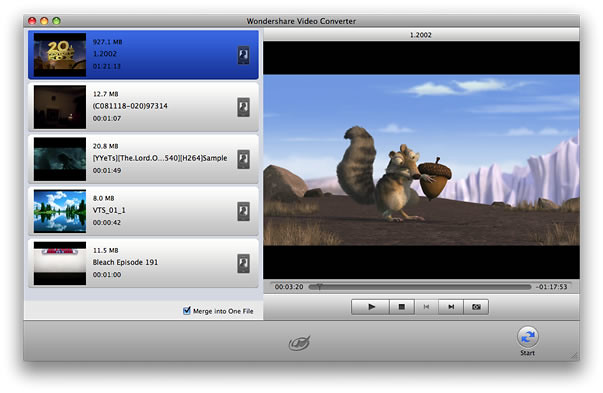
As it is mentioned above, so after converting MOD videos to MP4 or MOV and other QuickTime video formats, you can import [**mod to final cut pro mac**](http://www.applemacvideo.com/fcpmac/convert-mod-to-fcp-mac.html) successfully! if you still don'n know the basis of [**mod to fcp**](http://www.applemacvideo.com/fcpmac/convert-mod-to-fcp-mac.html), here some popular canon, Panasonic and JVC camcorders or camera records videos in MOD are collected in the following. hope these will help you to know more about [**mod to final cut pro**](http://www.applemacvideo.com/fcpmac/convert-mod-to-fcp-mac.html).
Canon: FS100, FS10, FS11, FS200 (2009), FS21 (2009), FS22 (2009)
Panasonic:SV-AV100,SDR-S100,SDR-S150, SDR-S10, SDR-H18, SDR-H200,SDR-H20 , SDR-H40, SDR-H60, SDR-SW20,SDR-S7,SDR-SW21(2009),SDR-S26(2009)
JVC:GZ-MC100, GZ-MC200, GZ-MG30, GZ-MG70, GZ-MG37, GZ-MG77, GZ-MG505, GZ-MG130,GZ-MG155,GZ-MG255,GZ-MG555,GZ-MS100U ,GZ-MG7230 ,GZ-MG630(2009),GZ-MG670(2009),GZ-MG680(2009)
Additionally, whatever brand camcorder or camera MOD you have, this [**mod to fcp mac**](http://www.applemacvideo.com/fcpmac/convert-mod-to-fcp-mac.html) converter can help you [**convert mod to final cut pro**](http://www.applemacvideo.com/fcpmac/convert-mod-to-fcp-mac.html). Or MOD video files from software, hardware or devices can all be converted successfully to FCP.
more tags:
[avchd to fcp](http://www.applemacvideo.com/fcpmac/convert-avchd-to-fcp-mac.html)|[avi to fcp](http://www.applemacvideo.com/fcpmac/convert-avi-to-fcp-mac.html)|[youtube to fcp](http://www.applemacvideo.com/fcpmac/convert-flv-to-fcp-mac.html)|[m4v to fcp](http://www.applemacvideo.com/fcpmac/convert-m4v-to-fcp-mac.html)|[mkv to fcp](http://www.applemacvideo.com/fcpmac/convert-mkv-to-fcp-mac.html)|[mod to fcp](http://www.applemacvideo.com/fcpmac/convert-mod-to-fcp-mac.html)|[mp3 to fcp](http://www.applemacvideo.com/fcpmac/convert-mp3-to-fcp-mac.html)|[mp4 to fcp](http://www.applemacvideo.com/fcpmac/convert-mp4-to-fcp-mac.html)|[mpeg to fcp](http://www.applemacvideo.com/fcpmac/convert-mpeg-to-fcp-mac.html)|[hd to fcp](http://www.applemacvideo.com/fcpmac/convert-tod-to-fcp-mac.html)|[vob to fcp](http://www.applemacvideo.com/fcpmac/convert-vob-to-fcp-mac.html)16:["$","p",null,{"className":"text-gray-700","children":"$1c"}]
17:["$","div",null,{"className":"flex items-center mt-4 space-x-4","children":["$","button",null,{"type":"button","className":"flex items-center font-medium text-sm text-gray-500 hover:underline dark:text-gray-400","children":[["$","svg",null,{"className":"mr-1.5 w-3 h-3","aria-hidden":"true","xmlns":"http://www.w3.org/2000/svg","fill":"currentColor","viewBox":"0 0 20 18","children":["$","path",null,{"d":"M18 0H2a2 2 0 0 0-2 2v9a2 2 0 0 0 2 2h2v4a1 1 0 0 0 1.707.707L10.414 13H18a2 2 0 0 0 2-2V2a2 2 0 0 0-2-2Zm-5 4h2a1 1 0 1 1 0 2h-2a1 1 0 1 1 0-2ZM5 4h5a1 1 0 1 1 0 2H5a1 1 0 0 1 0-2Zm2 5H5a1 1 0 0 1 0-2h2a1 1 0 0 1 0 2Zm9 0h-6a1 1 0 0 1 0-2h6a1 1 0 1 1 0 2Z"}]}],"Reply"]}]}]
1d:T40f,data:image/svg+xml;utf8,%3Csvg%20width%3D%2232%22%20height%3D%2232%22%20viewBox%3D%220%200%2032%2032%22%20%0A%20%20%20%20%20%20%20%20%20xmlns%3D%22http%3A%2F%2Fwww.w3.org%2F2000%2Fsvg%22%20role%3D%22img%22%20aria-label%3D%22Avatar%20for%20Guest%22%3E%0A%20%20%20%20%20%20%3Crect%20width%3D%22100%25%22%20height%3D%22100%25%22%20fill%3D%22hsl(280%2C%2080%25%2C%2050%25)%22%20rx%3D%223.2%22%20%2F%3E%0A%20%20%20%20%20%20%3Ctext%20x%3D%2250%25%22%20y%3D%2250%25%22%20%0A%20%20%20%20%20%20%20%20%20%20%20%20font-family%3D%22sans-serif%22%20%0A%20%20%20%20%20%20%20%20%20%20%20%20font-size%3D%2212.8%22%20%0A%20%20%20%20%20%20%20%20%20%20%20%20font-weight%3D%22bold%22%20%0A%20%20%20%20%20%20%20%20%20%20%20%20fill%3D%22%23FFFFFF%22%20%0A%20%20%20%20%20%20%20%20%20%20%20%20text-anchor%3D%22middle%22%20%0A%20%20%20%20%20%20%20%20%20%20%20%20dominant-baseline%3D%22central%22%0A%20%20%20%20%20%20%20%20%20%20%20%20style%3D%22user-select%3A%20none%3B%22%3E%0A%20%20%20%20%20%20%20%20G%0A%20%20%20%20%20%20%3C%2Ftext%3E%0A%20%20%20%20%3C%2Fsvg%3E18:["$","div","79035585528214",{"className":"border-l-4 border-gray-200 pl-4","children":[["$","div",null,{"className":"flex items-center gap-2 mb-2","children":["$","address",null,{"className":"flex items-center mb-6 not-italic","children":["$","div",null,{"className":"inline-flex items-center text-sm text-gray-900 dark:text-white","children":[["$","img",null,{"className":"mr-3 w-8 h-8 rounded-full","src":"$1d","alt":"Guest"}],["$","a",null,{"href":"/author/guest_73325980156310","rel":"author","className":"font-bold capitalize hover:underline dark:text-white","children":"Guest"}],["$","span",null,{"className":"mx-1 text-md text-gray-400 dark:text-gray-500","children":"·"}],"$undefined",["$","span",null,{"className":"mx-1 text-md text-gray-400 dark:text-gray-500","children":"·"}],["$","time",null,{"dateTime":"Wed Jun 16 2010","className":"text-gray-500 dark:text-gray-400","children":"Jun 16, 2010"}],"$undefined"]}]}]}],["$","p",null,{"className":"text-gray-700","children":"MP4 Converter is the quickest: [MP4 Converter](http://mp4-converter.info/) is the quickest conversion software I've used. It works for all video/music file formats that copmuter can replay! No adware, no watermarks, no viruses in MP4-Converter. It works amazing:)"}],["$","div",null,{"className":"flex items-center mt-4 space-x-4","children":["$","button",null,{"type":"button","className":"flex items-center font-medium text-sm text-gray-500 hover:underline dark:text-gray-400","children":[["$","svg",null,{"className":"mr-1.5 w-3 h-3","aria-hidden":"true","xmlns":"http://www.w3.org/2000/svg","fill":"currentColor","viewBox":"0 0 20 18","children":["$","path",null,{"d":"M18 0H2a2 2 0 0 0-2 2v9a2 2 0 0 0 2 2h2v4a1 1 0 0 0 1.707.707L10.414 13H18a2 2 0 0 0 2-2V2a2 2 0 0 0-2-2Zm-5 4h2a1 1 0 1 1 0 2h-2a1 1 0 1 1 0-2ZM5 4h5a1 1 0 1 1 0 2H5a1 1 0 0 1 0-2Zm2 5H5a1 1 0 0 1 0-2h2a1 1 0 0 1 0 2Zm9 0h-6a1 1 0 0 1 0-2h6a1 1 0 1 1 0 2Z"}]}],"Reply"]}]}]]}]
1e:T40f,data:image/svg+xml;utf8,%3Csvg%20width%3D%2232%22%20height%3D%2232%22%20viewBox%3D%220%200%2032%2032%22%20%0A%20%20%20%20%20%20%20%20%20xmlns%3D%22http%3A%2F%2Fwww.w3.org%2F2000%2Fsvg%22%20role%3D%22img%22%20aria-label%3D%22Avatar%20for%20Guest%22%3E%0A%20%20%20%20%20%20%3Crect%20width%3D%22100%25%22%20height%3D%22100%25%22%20fill%3D%22hsl(280%2C%2080%25%2C%2050%25)%22%20rx%3D%223.2%22%20%2F%3E%0A%20%20%20%20%20%20%3Ctext%20x%3D%2250%25%22%20y%3D%2250%25%22%20%0A%20%20%20%20%20%20%20%20%20%20%20%20font-family%3D%22sans-serif%22%20%0A%20%20%20%20%20%20%20%20%20%20%20%20font-size%3D%2212.8%22%20%0A%20%20%20%20%20%20%20%20%20%20%20%20font-weight%3D%22bold%22%20%0A%20%20%20%20%20%20%20%20%20%20%20%20fill%3D%22%23FFFFFF%22%20%0A%20%20%20%20%20%20%20%20%20%20%20%20text-anchor%3D%22middle%22%20%0A%20%20%20%20%20%20%20%20%20%20%20%20dominant-baseline%3D%22central%22%0A%20%20%20%20%20%20%20%20%20%20%20%20style%3D%22user-select%3A%20none%3B%22%3E%0A%20%20%20%20%20%20%20%20G%0A%20%20%20%20%20%20%3C%2Ftext%3E%0A%20%20%20%20%3C%2Fsvg%3E19:["$","div","78843385741718",{"className":"border-l-4 border-gray-200 pl-4","children":[["$","div",null,{"className":"flex items-center gap-2 mb-2","children":["$","address",null,{"className":"flex items-center mb-6 not-italic","children":["$","div",null,{"className":"inline-flex items-center text-sm text-gray-900 dark:text-white","children":[["$","img",null,{"className":"mr-3 w-8 h-8 rounded-full","src":"$1e","alt":"Guest"}],["$","a",null,{"href":"/author/guest_73325980156310","rel":"author","className":"font-bold capitalize hover:underline dark:text-white","children":"Guest"}],["$","span",null,{"className":"mx-1 text-md text-gray-400 dark:text-gray-500","children":"·"}],"$undefined",["$","span",null,{"className":"mx-1 text-md text-gray-400 dark:text-gray-500","children":"·"}],["$","time",null,{"dateTime":"Mon Sep 07 2009","className":"text-gray-500 dark:text-gray-400","children":"Sep 7, 2009"}],"$undefined"]}]}]}],["$","p",null,{"className":"text-gray-700","children":"good quality with fast speed: good quality with fast speed . the best choice for many people"}],["$","div",null,{"className":"flex items-center mt-4 space-x-4","children":["$","button",null,{"type":"button","className":"flex items-center font-medium text-sm text-gray-500 hover:underline dark:text-gray-400","children":[["$","svg",null,{"className":"mr-1.5 w-3 h-3","aria-hidden":"true","xmlns":"http://www.w3.org/2000/svg","fill":"currentColor","viewBox":"0 0 20 18","children":["$","path",null,{"d":"M18 0H2a2 2 0 0 0-2 2v9a2 2 0 0 0 2 2h2v4a1 1 0 0 0 1.707.707L10.414 13H18a2 2 0 0 0 2-2V2a2 2 0 0 0-2-2Zm-5 4h2a1 1 0 1 1 0 2h-2a1 1 0 1 1 0-2ZM5 4h5a1 1 0 1 1 0 2H5a1 1 0 0 1 0-2Zm2 5H5a1 1 0 0 1 0-2h2a1 1 0 0 1 0 2Zm9 0h-6a1 1 0 0 1 0-2h6a1 1 0 1 1 0 2Z"}]}],"Reply"]}]}]]}]
1f:T40f,data:image/svg+xml;utf8,%3Csvg%20width%3D%2232%22%20height%3D%2232%22%20viewBox%3D%220%200%2032%2032%22%20%0A%20%20%20%20%20%20%20%20%20xmlns%3D%22http%3A%2F%2Fwww.w3.org%2F2000%2Fsvg%22%20role%3D%22img%22%20aria-label%3D%22Avatar%20for%20Guest%22%3E%0A%20%20%20%20%20%20%3Crect%20width%3D%22100%25%22%20height%3D%22100%25%22%20fill%3D%22hsl(280%2C%2080%25%2C%2050%25)%22%20rx%3D%223.2%22%20%2F%3E%0A%20%20%20%20%20%20%3Ctext%20x%3D%2250%25%22%20y%3D%2250%25%22%20%0A%20%20%20%20%20%20%20%20%20%20%20%20font-family%3D%22sans-serif%22%20%0A%20%20%20%20%20%20%20%20%20%20%20%20font-size%3D%2212.8%22%20%0A%20%20%20%20%20%20%20%20%20%20%20%20font-weight%3D%22bold%22%20%0A%20%20%20%20%20%20%20%20%20%20%20%20fill%3D%22%23FFFFFF%22%20%0A%20%20%20%20%20%20%20%20%20%20%20%20text-anchor%3D%22middle%22%20%0A%20%20%20%20%20%20%20%20%20%20%20%20dominant-baseline%3D%22central%22%0A%20%20%20%20%20%20%20%20%20%20%20%20style%3D%22user-select%3A%20none%3B%22%3E%0A%20%20%20%20%20%20%20%20G%0A%20%20%20%20%20%20%3C%2Ftext%3E%0A%20%20%20%20%3C%2Fsvg%3E1a:["$","div","78842714653078",{"className":"border-l-4 border-gray-200 pl-4","children":[["$","div",null,{"className":"flex items-center gap-2 mb-2","children":["$","address",null,{"className":"flex items-center mb-6 not-italic","children":["$","div",null,{"className":"inline-flex items-center text-sm text-gray-900 dark:text-white","children":[["$","img",null,{"className":"mr-3 w-8 h-8 rounded-full","src":"$1f","alt":"Guest"}],["$","a",null,{"href":"/author/guest_73325980156310","rel":"author","className":"font-bold capitalize hover:underline dark:text-white","children":"Guest"}],["$","span",null,{"className":"mx-1 text-md text-gray-400 dark:text-gray-500","children":"·"}],"$undefined",["$","span",null,{"className":"mx-1 text-md text-gray-400 dark:text-gray-500","children":"·"}],["$","time",null,{"dateTime":"Sat Sep 05 2009","className":"text-gray-500 dark:text-gray-400","children":"Sep 5, 2009"}],"$undefined"]}]}]}],["$","p",null,{"className":"text-gray-700","children":"Yea good stuff...: Yea good stuff..."}],["$","div",null,{"className":"flex items-center mt-4 space-x-4","children":["$","button",null,{"type":"button","className":"flex items-center font-medium text-sm text-gray-500 hover:underline dark:text-gray-400","children":[["$","svg",null,{"className":"mr-1.5 w-3 h-3","aria-hidden":"true","xmlns":"http://www.w3.org/2000/svg","fill":"currentColor","viewBox":"0 0 20 18","children":["$","path",null,{"d":"M18 0H2a2 2 0 0 0-2 2v9a2 2 0 0 0 2 2h2v4a1 1 0 0 0 1.707.707L10.414 13H18a2 2 0 0 0 2-2V2a2 2 0 0 0-2-2Zm-5 4h2a1 1 0 1 1 0 2h-2a1 1 0 1 1 0-2ZM5 4h5a1 1 0 1 1 0 2H5a1 1 0 0 1 0-2Zm2 5H5a1 1 0 0 1 0-2h2a1 1 0 0 1 0 2Zm9 0h-6a1 1 0 0 1 0-2h6a1 1 0 1 1 0 2Z"}]}],"Reply"]}]}]]}]
21:Teef,How to import MOD to Final Cut Pro for Mac (Snow Leopard include: Abstract: what is Final Cut Pro? The article tells you something about Final Cut Pro and tips on how to import [**mod to fcp**](http://www.applemacvideo.com/fcpmac/convert-mod-to-fcp-mac.html) for edit. At last, some MOD camcorders are listed.

What’s Final Cut Pro? See [**mod to fcp mac**](http://www.applemacvideo.com/fcpmac/convert-mod-to-fcp-mac.html) converter.
Famous Camcorder Companies such as Canon, Panasonic and JVC have released camcorder models that store SD videos in MOD (MPEG2) video format. However, original MOD videos can’t be imported to Final Cut Pro. Many Mac users have proved this voice via the main famous Mac forum.
How to [**import mod to fcp**](http://www.applemacvideo.com/fcpmac/convert-mod-to-fcp-mac.html) for Mac?
This [**mod to fcp mac**](http://www.applemacvideo.com/fcpmac/convert-mod-to-fcp-mac.html) converter can original [**convert mod to fcp**](http://www.applemacvideo.com/fcpmac/convert-mod-to-fcp-mac.html) with good quality and only several clicks. It can convert [**mod to final cut pro**](http://www.applemacvideo.com/fcpmac/convert-mod-to-fcp-mac.html) and orther formats including MOV, FLV, MP4, etc. and other HD videos (HD MP4, HD WMV, HD MOV, etc). It also extracts and converts audio track from your MOD video files as WAV, MKA, OGG, 3GP, Mp3 and M4A.

As it is mentioned above, so after converting MOD videos to MP4 or MOV and other QuickTime video formats, you can import [**mod to final cut pro mac**](http://www.applemacvideo.com/fcpmac/convert-mod-to-fcp-mac.html) successfully! if you still don'n know the basis of [**mod to fcp**](http://www.applemacvideo.com/fcpmac/convert-mod-to-fcp-mac.html), here some popular canon, Panasonic and JVC camcorders or camera records videos in MOD are collected in the following. hope these will help you to know more about [**mod to final cut pro**](http://www.applemacvideo.com/fcpmac/convert-mod-to-fcp-mac.html).
Canon: FS100, FS10, FS11, FS200 (2009), FS21 (2009), FS22 (2009)
Panasonic:SV-AV100,SDR-S100,SDR-S150, SDR-S10, SDR-H18, SDR-H200,SDR-H20 , SDR-H40, SDR-H60, SDR-SW20,SDR-S7,SDR-SW21(2009),SDR-S26(2009)
JVC:GZ-MC100, GZ-MC200, GZ-MG30, GZ-MG70, GZ-MG37, GZ-MG77, GZ-MG505, GZ-MG130,GZ-MG155,GZ-MG255,GZ-MG555,GZ-MS100U ,GZ-MG7230 ,GZ-MG630(2009),GZ-MG670(2009),GZ-MG680(2009)
Additionally, whatever brand camcorder or camera MOD you have, this [**mod to fcp mac**](http://www.applemacvideo.com/fcpmac/convert-mod-to-fcp-mac.html) converter can help you [**convert mod to final cut pro**](http://www.applemacvideo.com/fcpmac/convert-mod-to-fcp-mac.html). Or MOD video files from software, hardware or devices can all be converted successfully to FCP.
more tags:
[avchd to fcp](http://www.applemacvideo.com/fcpmac/convert-avchd-to-fcp-mac.html)|[avi to fcp](http://www.applemacvideo.com/fcpmac/convert-avi-to-fcp-mac.html)|[youtube to fcp](http://www.applemacvideo.com/fcpmac/convert-flv-to-fcp-mac.html)|[m4v to fcp](http://www.applemacvideo.com/fcpmac/convert-m4v-to-fcp-mac.html)|[mkv to fcp](http://www.applemacvideo.com/fcpmac/convert-mkv-to-fcp-mac.html)|[mod to fcp](http://www.applemacvideo.com/fcpmac/convert-mod-to-fcp-mac.html)|[mp3 to fcp](http://www.applemacvideo.com/fcpmac/convert-mp3-to-fcp-mac.html)|[mp4 to fcp](http://www.applemacvideo.com/fcpmac/convert-mp4-to-fcp-mac.html)|[mpeg to fcp](http://www.applemacvideo.com/fcpmac/convert-mpeg-to-fcp-mac.html)|[hd to fcp](http://www.applemacvideo.com/fcpmac/convert-tod-to-fcp-mac.html)|[vob to fcp](http://www.applemacvideo.com/fcpmac/convert-vob-to-fcp-mac.html)22:Teef,How to import MOD to Final Cut Pro for Mac (Snow Leopard include: Abstract: what is Final Cut Pro? The article tells you something about Final Cut Pro and tips on how to import [**mod to fcp**](http://www.applemacvideo.com/fcpmac/convert-mod-to-fcp-mac.html) for edit. At last, some MOD camcorders are listed.

What’s Final Cut Pro? See [**mod to fcp mac**](http://www.applemacvideo.com/fcpmac/convert-mod-to-fcp-mac.html) converter.
Famous Camcorder Companies such as Canon, Panasonic and JVC have released camcorder models that store SD videos in MOD (MPEG2) video format. However, original MOD videos can’t be imported to Final Cut Pro. Many Mac users have proved this voice via the main famous Mac forum.
How to [**import mod to fcp**](http://www.applemacvideo.com/fcpmac/convert-mod-to-fcp-mac.html) for Mac?
This [**mod to fcp mac**](http://www.applemacvideo.com/fcpmac/convert-mod-to-fcp-mac.html) converter can original [**convert mod to fcp**](http://www.applemacvideo.com/fcpmac/convert-mod-to-fcp-mac.html) with good quality and only several clicks. It can convert [**mod to final cut pro**](http://www.applemacvideo.com/fcpmac/convert-mod-to-fcp-mac.html) and orther formats including MOV, FLV, MP4, etc. and other HD videos (HD MP4, HD WMV, HD MOV, etc). It also extracts and converts audio track from your MOD video files as WAV, MKA, OGG, 3GP, Mp3 and M4A.

As it is mentioned above, so after converting MOD videos to MP4 or MOV and other QuickTime video formats, you can import [**mod to final cut pro mac**](http://www.applemacvideo.com/fcpmac/convert-mod-to-fcp-mac.html) successfully! if you still don'n know the basis of [**mod to fcp**](http://www.applemacvideo.com/fcpmac/convert-mod-to-fcp-mac.html), here some popular canon, Panasonic and JVC camcorders or camera records videos in MOD are collected in the following. hope these will help you to know more about [**mod to final cut pro**](http://www.applemacvideo.com/fcpmac/convert-mod-to-fcp-mac.html).
Canon: FS100, FS10, FS11, FS200 (2009), FS21 (2009), FS22 (2009)
Panasonic:SV-AV100,SDR-S100,SDR-S150, SDR-S10, SDR-H18, SDR-H200,SDR-H20 , SDR-H40, SDR-H60, SDR-SW20,SDR-S7,SDR-SW21(2009),SDR-S26(2009)
JVC:GZ-MC100, GZ-MC200, GZ-MG30, GZ-MG70, GZ-MG37, GZ-MG77, GZ-MG505, GZ-MG130,GZ-MG155,GZ-MG255,GZ-MG555,GZ-MS100U ,GZ-MG7230 ,GZ-MG630(2009),GZ-MG670(2009),GZ-MG680(2009)
Additionally, whatever brand camcorder or camera MOD you have, this [**mod to fcp mac**](http://www.applemacvideo.com/fcpmac/convert-mod-to-fcp-mac.html) converter can help you [**convert mod to final cut pro**](http://www.applemacvideo.com/fcpmac/convert-mod-to-fcp-mac.html). Or MOD video files from software, hardware or devices can all be converted successfully to FCP.
more tags:
[avchd to fcp](http://www.applemacvideo.com/fcpmac/convert-avchd-to-fcp-mac.html)|[avi to fcp](http://www.applemacvideo.com/fcpmac/convert-avi-to-fcp-mac.html)|[youtube to fcp](http://www.applemacvideo.com/fcpmac/convert-flv-to-fcp-mac.html)|[m4v to fcp](http://www.applemacvideo.com/fcpmac/convert-m4v-to-fcp-mac.html)|[mkv to fcp](http://www.applemacvideo.com/fcpmac/convert-mkv-to-fcp-mac.html)|[mod to fcp](http://www.applemacvideo.com/fcpmac/convert-mod-to-fcp-mac.html)|[mp3 to fcp](http://www.applemacvideo.com/fcpmac/convert-mp3-to-fcp-mac.html)|[mp4 to fcp](http://www.applemacvideo.com/fcpmac/convert-mp4-to-fcp-mac.html)|[mpeg to fcp](http://www.applemacvideo.com/fcpmac/convert-mpeg-to-fcp-mac.html)|[hd to fcp](http://www.applemacvideo.com/fcpmac/convert-tod-to-fcp-mac.html)|[vob to fcp](http://www.applemacvideo.com/fcpmac/convert-vob-to-fcp-mac.html)1b:["$","$L20",null,{"postId":"76327726088598","endCursor":"78842714653078","initialComments":[{"id":"79278586724758","content":"I have been used to convert videos to mp4 such: I have been used to convert videos to mp4 such as mp4 to final cut pro using [leawo video converter](http://www.leawo.com/leawo-video-converter/), and I read this article and found that this one is good, too.But I just don' t know which one is better.","contentHtml":"I have been used to convert videos to mp4 such: I have been used to convert videos to mp4 such as mp4 to final cut pro using [leawo video converter](http://www.leawo.com/leawo-video-converter/), and I read this article and found that this one is good, too.But I just don' t know which one is better.","metadata":null,"isApproved":true,"createdAt":"$D2012-10-16T09:29:31.000Z","updatedAt":"$D2012-10-29T09:57:15.000Z","authorId":"74553720045974","postId":"76327726088598","parentId":null,"author":{"id":"74553720045974","nickName":"Rosaura1234","username":"rosaura1234_74553720045974","email":"rosauragaffney@gmail.com","role":"USER","isAdmin":false,"image":null,"metadata":null,"salt":null,"publicKey":null,"lastLogin":null,"failedAttempts":0,"lockedUntil":null,"recoveryPhraseHash":null,"recoveryCreatedAt":null,"createdAt":"$D2012-10-16T09:22:04.000Z","updatedAt":"$D2012-12-05T08:55:19.000Z"}},{"id":"79075917955478","content":"$21","contentHtml":"$22","metadata":null,"isApproved":true,"createdAt":"$D2010-08-17T11:50:07.000Z","updatedAt":"$D2010-08-17T11:50:07.000Z","authorId":"73636794859926","postId":"76327726088598","parentId":null,"author":{"id":"73636794859926","nickName":"crisbmw","username":"crisbmw_73636794859926","email":"a148733@bofthew.com","role":"USER","isAdmin":false,"image":null,"metadata":null,"salt":null,"publicKey":null,"lastLogin":null,"failedAttempts":0,"lockedUntil":null,"recoveryPhraseHash":null,"recoveryCreatedAt":null,"createdAt":"$D2010-06-11T01:21:33.000Z","updatedAt":"$D2010-08-17T11:49:28.000Z"}},{"id":"79035585528214","content":"MP4 Converter is the quickest: [MP4 Converter](http://mp4-converter.info/) is the quickest conversion software I've used. It works for all video/music file formats that copmuter can replay! No adware, no watermarks, no viruses in MP4-Converter. It works amazing:)","contentHtml":"MP4 Converter is the quickest: [MP4 Converter](http://mp4-converter.info/) is the quickest conversion software I've used. It works for all video/music file formats that copmuter can replay! No adware, no watermarks, no viruses in MP4-Converter. It works amazing:)","metadata":null,"isApproved":true,"createdAt":"$D2010-06-16T11:05:46.000Z","updatedAt":"$D2010-06-16T11:05:46.000Z","authorId":"73325980156310","postId":"76327726088598","parentId":null,"author":{"id":"73325980156310","nickName":"Guest","username":"guest_73325980156310","email":"guest@example.com","role":"USER","isAdmin":false,"image":null,"metadata":null,"salt":null,"publicKey":null,"lastLogin":null,"failedAttempts":0,"lockedUntil":null,"recoveryPhraseHash":null,"recoveryCreatedAt":null,"createdAt":"$D2005-01-01T00:00:00.000Z","updatedAt":"$D2005-01-01T00:00:00.000Z"}},{"id":"78843385741718","content":"good quality with fast speed: good quality with fast speed . the best choice for many people","contentHtml":"good quality with fast speed: good quality with fast speed . the best choice for many people","metadata":null,"isApproved":true,"createdAt":"$D2009-09-07T01:09:22.000Z","updatedAt":"$D2009-09-07T01:09:22.000Z","authorId":"73325980156310","postId":"76327726088598","parentId":null,"author":{"id":"73325980156310","nickName":"Guest","username":"guest_73325980156310","email":"guest@example.com","role":"USER","isAdmin":false,"image":null,"metadata":null,"salt":null,"publicKey":null,"lastLogin":null,"failedAttempts":0,"lockedUntil":null,"recoveryPhraseHash":null,"recoveryCreatedAt":null,"createdAt":"$D2005-01-01T00:00:00.000Z","updatedAt":"$D2005-01-01T00:00:00.000Z"}},{"id":"78842714653078","content":"Yea good stuff...: Yea good stuff...","contentHtml":"Yea good stuff...: Yea good stuff...","metadata":null,"isApproved":true,"createdAt":"$D2009-09-05T19:03:18.000Z","updatedAt":"$D2009-09-05T19:03:18.000Z","authorId":"73325980156310","postId":"76327726088598","parentId":null,"author":{"id":"73325980156310","nickName":"Guest","username":"guest_73325980156310","email":"guest@example.com","role":"USER","isAdmin":false,"image":null,"metadata":null,"salt":null,"publicKey":null,"lastLogin":null,"failedAttempts":0,"lockedUntil":null,"recoveryPhraseHash":null,"recoveryCreatedAt":null,"createdAt":"$D2005-01-01T00:00:00.000Z","updatedAt":"$D2005-01-01T00:00:00.000Z"}}]}]